AhaPrompt
Prompts
Featured
Models
Submit
Blog
Home
AI Prompt Library
Game Assets
Game Assets Prompts
Explore the best Game Assets prompts for AI image, video, and audio generation.
Browse AI Image Prompts
Browse AI Video Prompts
Browse AI Music & Voice Prompts
AI Prompt Library
All
Images
Videos
Audio
Newest
Popular
All categories
3D Render
Abstract
Advertising
Aerial
Ambient
Animals
Animation
Anime
Architecture
Avatar
Black & White
Bright
Cartoon
Character
Cinematic
Cityscape
Classical
Comic
Cyberpunk
Dark
Digital Art
Dramatic
Dynamic
Electronic
Ethereal
Fantasy
Fashion
Folk
Food
Game Assets
Gothic
Hip-Hop
Historical
Holiday
Horror
Infographic
Jazz
Landscape
Lo-Fi
Logo Design
Macro
Minimalist
Motion Graphics
Music Video
Mysterious
Mythology
Nature
Neon
Oil Painting
Peaceful
Pixel Art
Pop
Pop Art
Portrait
Poster
Product Photography
R&B
Realistic
Rock
Sci-Fi
Short Film
Sketch
Slow Motion
Sound Effects
Space
Sports
Steampunk
Sticker
Still Life
Street Photography
Surreal
Tattoo
Timelapse
Trailer
Typography
Vector
Vehicles
VFX
Vintage
Voiceover
Wallpaper
Watercolor
Whimsical
0:24
A
Claude Opus 5.5
Rebuild [any device] in code, part by part: 1. Write the parts list first, with dimensions. 2. Make every part its own function. Place them one at a time. 3. After each part, check clearance (≥ 0.05 mm), clashes and cable bends. Stop and fix anything that fails. 4. Animate the moving parts last. Show me the parts list first. No code until I say go.
0
Details
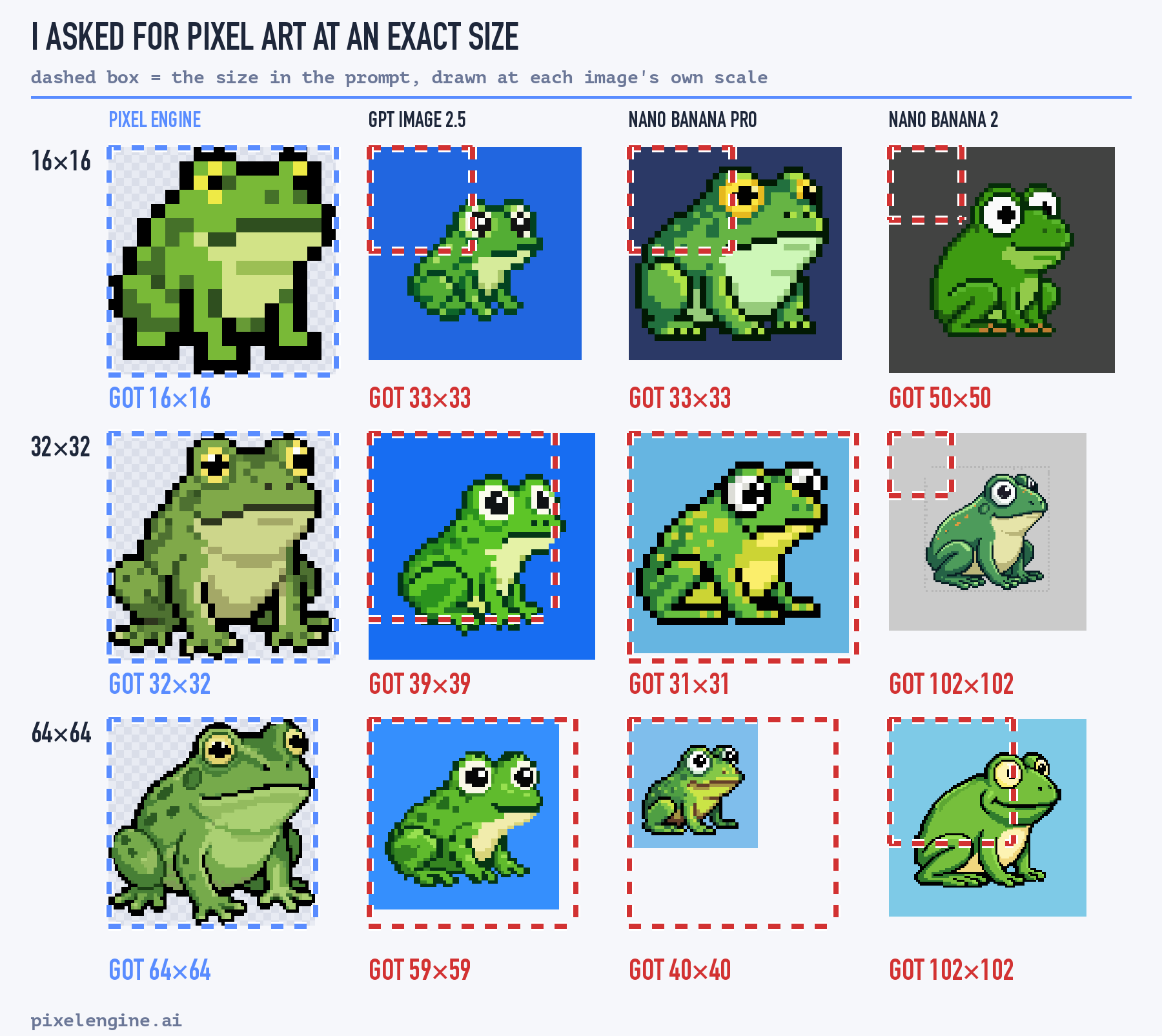
GPT Image 2.5
Exactly 16x16 pixels: the whole image is a 16 by 16 pixel grid, one sprite filling it.
0
Details
0:15
Seedance 2.5
VIDEO SPECIFICATIONS Duration: 15 seconds. Aspect ratio: 16:9. Visual style: Photorealistic cinematic 3D rendering, highly detailed character models, realistic armor materials, dramatic lighting, physically believable movement. Genre: Cinematic comedy with a subtle punchline. Camera: One continuous cinematic pullback, transitioning from full-screen fighting game footage to a wide over-the-shoulder view of the gaming room. Audio: Fighting game sound effects, atmospheric background music, announcer voice, realistic environmental sounds, synchronized English dialogue. CHARACTER DESIGNS AND CONTINUITY Sub-Zero: An iconic Mortal Kombat ninja wearing detailed blue-and-black armor, a lower-face mask, and protective plating. His appearance is recognizable, muscular, and realistic. He will always sit on the LEFT side of the couch. Scorpion: An iconic Mortal Kombat ninja wearing detailed yellow-and-black armor, a lower-face mask, and dark metallic protective plating. His appearance is recognizable, muscular, and realistic. He will always sit on the RIGHT side of the couch. Maintain consistent character designs, body proportions, armor details, and color schemes throughout the entire video. Never switch the characters' positions. SCENE 1 — MORTAL KOMBAT GAMEPLAY 00:00–00:04 The video begins directly with full-screen Mortal Kombat gameplay. The game image fills the entire frame. No television borders, gaming room, or real-world surroundings are visible. The image looks like actual gameplay from a modern, high-budget Mortal Kombat fighting game. The fighting arena features a dark stone floor, dramatic cinematic lighting, atmospheric depth, and subtle environmental effects. Two fighters face each other at medium distance. LEFT: SUB-ZERO Sub-Zero wears recognizable blue-and-black ninja armor with a face mask and detailed protective plating. RIGHT: SCORPION Scorpion wears recognizable yellow-and-black ninja armor with a face mask and dark metallic details. GAME HUD — EXACT HEALTH BAR CONFIGURATION Two horizontal health bars are clearly visible at the top of the gameplay screen. LEFT HEALTH BAR — SUB-ZERO The name SUB-ZERO appears in uppercase letters directly above the left health bar. The entire health bar is filled with solid GREEN, representing 100% health. No red sections are visible. RIGHT HEALTH BAR — SCORPION The name SCORPION appears in uppercase letters directly above the right health bar. Exactly one-third of the health bar is GREEN, representing approximately 33% remaining health. The remaining two-thirds are RED. Both health bars are horizontally aligned, symmetrical, and positioned at the top of the screen. The names are correctly assigned and remain legible. Do not reverse the fighters, their names, or their health bars. Preserve the specified colors and health levels until the exact moment described below. ACTION Scorpion suddenly lunges forward and attempts to attack Sub-Zero. Sub-Zero quickly dodges the incoming attack and immediately counters with a powerful uppercut. Sub-Zero's fist connects directly with Scorpion's chin. The impact is forceful and convincing. Scorpion's head snaps backward, his upper body is launched upward, and his feet briefly lose contact with the ground. Scorpion lands awkwardly and staggers backward. He begins swaying from side to side, barely maintaining his balance. His arms drop loosely, and his movements become uncoordinated, resembling the characteristic stunned animation of a defeated opponent in Mortal Kombat. Sub-Zero calmly returns to his fighting stance. Audio: A sharp uppercut impact, a powerful fighting game hit sound, and a short stun effect. Tense fighting game music plays underneath. SCENE 2 — FINISH HIM 00:04–00:06 Scorpion continues staggering helplessly after the uppercut. His body sways forward and backward. He is visibly stunned and unable to defend himself. At this exact moment, Scorpion's health bar changes. The entire RIGHT health bar becomes solid RED. No green sections remain. Sub-Zero's LEFT health bar remains completely GREEN. A large, aggressive title suddenly appears in the CENTER of the gameplay screen: FINISH HIM The text is blood-red, with rough, menacing typography and subtle dripping-blood details, inspired by the iconic Mortal Kombat finishing sequence. The title appears with a brief dramatic visual impact. It is centered, clearly readable, and does not obscure the fighter names or health bars at the top of the screen. Scorpion continues staggering helplessly in the background while Sub-Zero remains composed. Audio: A deep, powerful male fighting game announcer clearly shouts: "Finish Him!" The background music drops in volume immediately afterward, creating a brief moment of anticipation. SCENE 3 — THE CAMERA REVEALS THE GAMING ROOM 00:06–00:10 Immediately after the words "FINISH HIM" appear, the camera begins a smooth, continuous physical pullback. Initially, the frame is still completely filled with the Mortal Kombat gameplay image. As the camera moves backward, the edges of the game image gradually become visible. The viewer slowly realizes that the gameplay is being displayed on a large television. The camera continues pulling backward, revealing the television's physical frame, the TV stand, a gaming console, and the surrounding gaming room. This is ONE CONTINUOUS CAMERA MOVEMENT. No cuts. No jump cuts. N
0
Details
0:25
GPT-6 Astra
build a huge, highly detailed recreation of New York in this Minecraft world. area: 1,024 by 1,024 blocks, centered on the spawn point. plan first, build second. write the plan to a file before you place a single block. the plan must list the districts: financial district, midtown, Central Park and the waterfront. it must also list the road grid with avenues and cross streets, at least 100 skyscrapers of different heights and materials, and the main landmarks. use only vanilla blocks and Minecraft commands: /fill, /setblock, /forceload. build in modules, one district at a time. after each module, check that the blocks are where the plan says, fix what's off, then move on. write one progress line after every module. don't ask me questions, keep working until the whole map is done.
0
Details
0:48
GPT-6 Astra
Do a full animation with sound of anthropic mascote with the newset model of Opus 5.5 fighting against OpenAI mascotte with the new astra models Sol etc like the intro of pokemon fire red and leaf green. Same animations
0
Details
0:30
Seedance 2.5
Create a 30-second ultra-realistic AAA open-world third-person action game mission, fully rendered as authentic GTA-style gameplay from beginning to end. Generate the female player character yourself: a stylish young woman with long dark hair, dark fitted jacket, dark pants and practical boots, keeping her appearance perfectly consistent throughout. Set the mission at a massive modern cargo ship at night, surrounded by dark ocean, shipping containers, cranes, realistic water, rain and distant city lights. Use a true third-person gameplay camera, realistic game physics, detailed game-engine graphics and a complete GTA-style HUD with minimap, mission objectives and notifications. At 0–4 seconds, the character quietly climbs onto the cargo ship and the HUD shows MISSION START — CARGO SHIP — FIND THE PACKAGE. At 4–9 seconds, she moves between stacked containers while avoiding security guards and reaches the marked container; HUD changes to CONTAINER LOCATED. At 9–14 seconds, she opens the container, retrieves a mysterious package and the HUD shows PACKAGE SECURED. At 14–18 seconds, an alarm suddenly activates, red warning lights flash and security begins searching the ship; HUD changes to ALARM TRIGGERED — ESCAPE. At 18–24 seconds, she runs through the container area toward the edge of the ship while security follows, then reaches a waiting speedboat below. At 24–27 seconds, she jumps into the speedboat and rapidly drives away across the ocean as the cargo ship recedes behind her. At 27 seconds, make exactly one hard cut to a natural third-person gameplay continuation showing her speedboat racing toward distant city lights, with the HUD displaying MISSION PASSED — PACKAGE SECURED — ESCAPE SUCCESSFUL — RANK S. Make the entire video look like high-budget GTA gameplay, including authentic HUD, minimap, NPC behavior, camera movement, water physics, vehicle physics, lighting and reflections. No live-action look, anime, cartoon, random cuts, teleportation or graphic gore.
0
Details
0:24
Wan 3.0
Create a 30-second hyper-realistic live PUBG-style battle royale gameplay livestream, presented as if captured directly from a professional gaming streamer’s screen. 16:9, 4K, photorealistic graphics, realistic game physics, cinematic lighting, highly detailed environments, smooth 60fps gameplay. 0–4 sec: Open with a realistic third-person battle royale scene on a huge military island. Show the complete gaming interface naturally on screen: mini-map, compass, health bar, armor indicator, weapon slots, ammo counter, kill feed, teammate icons, ping indicator, sprint button, crouch/prone/jump controls and inventory indicators. Player runs through a ruined urban area while distant gunfire and explosions are visible. Add subtle livestream elements such as viewer count and chat reactions. 4–8 sec: Rapid transition into an intense sniper moment. Player raises a high-powered sniper rifle. Camera smoothly moves behind the character and enters the scope. Extreme close-up / zoom-in sniper shot, realistic scope glass, breathing movement, subtle weapon sway, enemy moving far across a rooftop. Focus shifts from the environment to the target. Trigger pull and realistic muzzle flash, followed by a precise hit. 8–12 sec: Immediately cut to a fast vehicle chase through a dusty battlefield. Camera shakes naturally with the vehicle suspension. Bullets hit nearby walls and the vehicle, sparks flying. Teammate markers and directional damage indicators appear on the HUD. 12–17 sec: Look upward as a military helicopter flies low over the battlefield. Player quickly switches to a shoulder-mounted launcher. Show the weapon interface and targeting reticle. Camera follows the helicopter dynamically, then launches a projectile. Cinematic tracking shot follows the projectile toward the helicopter, with realistic smoke trail, atmospheric depth and motion blur. 17–21 sec: Helicopter takes damage and loses control, spinning through smoke while the player and squad move through cover. Cut between wide battlefield view and intense close-up gameplay perspective. Add realistic explosions, debris, dust, sparks and environmental destruction. 21–25 sec: Squad enters a final enemy compound. Rapid tactical movement through a building, realistic weapon handling, muzzle flashes, shell casings, shadows and volumetric lighting. HUD updates rapidly as enemies are eliminated. Keep everything visually coherent and grounded in believable game mechanics. 25–28 sec: Final enemy encounter. Switch to slow-motion sniper scope zoom. Extreme close-up of the crosshair locking onto the target. Heartbeat-like tension, subtle camera shake, then one decisive shot. Display a realistic elimination notification. 28–30 sec: Pull back into a dramatic wide aerial view of the entire battlefield. Helicopter wreckage, vehicles, smoke and the squad visible below. End with a realistic “WINNER / VICTORY” style battle royale screen, player statistics, eliminations, survival time and team information appearing naturally on the interface. Visual direction: authentic AAA battle-royale graphics, photorealistic textures, realistic human movement, natural animation, physically accurate explosions, detailed weapons, believable recoil, realistic shadows, atmospheric fog, volumetric sunlight, dynamic camera movement, subtle screen shake, realistic motion blur, high-detail terrain, cinematic depth of field, seamless transitions, no cartoon look, no artificial CGI appearance, no distorted characters, no warped weapons, no floating objects, no broken HUD elements. Camera: combine gameplay POV, third-person gameplay, over-the-shoulder shots, extreme sniper scope zoom, helicopter tracking shot, projectile-follow camera, tactical close-ups and dramatic aerial establishing shot. Make every transition feel like a real high-end PUBG-style livestream recording
0
Details
0:30
Wan 3.0
Create a 30-second ultra-realistic AAA third-person/first-person hybrid livestream gameplay video, 16:9, 4K, resembling an actual professional competitive game being livestreamed. The game is an original tactical snapping/shooting game with a futuristic precision weapon. Make everything feel like real playable gameplay, not a cinematic trailer. GAMEPLAY STYLE: Unreal Engine 5 quality, realistic physics, responsive controls, detailed environments, professional streamer HUD, weapon animations, hit feedback, minimap, ammo counter, health/armor, objective tracker, kill feed, crosshair, score, ping/FPS indicators, and livestream overlay. PLAYER: Professional gamer controlling a futuristic Snapper Precision Gun capable of switching between normal direct targeting, optical lens targeting, and microscopic ultra-precision targeting. 0–6 SEC — DIRECT SNAP The player moves through an abandoned industrial facility while enemies appear from different directions. Quick camera movement → player raises the Snapper Gun → direct hip/shoulder aim → rapid precision shots eliminate two enemy targets. HUD instantly updates the score and kill feed. ON-SCREEN: ENEMIES: 6 | AMMO: 24/120 | HP: 100 | ARMOR: 75 | SCORE: 1,250 6–12 SEC — OPTICAL LENS MODE The player spots an enemy far across the facility. Weapon switches into high-powered optical lens mode. Screen smoothly transitions into a realistic scope view with lens reflections, distance marker, wind indicator, rangefinder and moving reticle. The player tracks the enemy through the lens → precise shot → enemy drops behind cover. HUD: OPTICAL MODE | RANGE: 187M | ACCURACY: 94% 12–19 SEC — MICROSCOPIC SNAP MODE The player discovers a tiny exposed component on an enemy's futuristic shield. Activate Microscope Snap Mode. The screen dramatically magnifies the target, showing an extremely detailed microscopic targeting interface. The reticle locks onto the tiny weak point → satisfying precision snap → shield breaks → enemy becomes vulnerable. HUD: MICRO SNAP LOCKED | WEAK POINT DETECTED | +500 19–25 SEC — RAPID COMBAT Three enemies rush the player from different angles. The player instantly switches back to direct mode, slides behind cover, leans out and performs fast precision snaps. Add realistic muzzle flashes, recoil, shell/effect particles, impact sparks, environmental destruction and smooth weapon animations. KILL FEED: PLAYER — PRECISION SNAP — ENEMY PLAYER — HEADSHOT — ENEMY 25–30 SEC — FINAL TARGET Only one enemy remains. The player runs upstairs while the enemy escapes through a narrow corridor. Switch between direct view → optical lens → microscope precision mode in one fluid sequence. The microscopic reticle locks onto a tiny glowing weak point. FINAL SNAP. The screen displays: TARGET ELIMINATED MISSION COMPLETE PRECISION: 97% TOTAL SCORE: 4,850 End with the professional livestream interface still visible, including LIVE indicator, viewer count, chat panel, FPS, ping, minimap, health, armor, ammo, objective tracker, kill feed and weapon status. IMPORTANT: Everything must look like a polished real AAA game: consistent speed, realistic movement, accurate weapon animations, responsive HUD, professional UI, natural camera motion, synchronized sound effects, realistic lighting and shadows, no glitches, no floating objects, no random UI elements, no copyrighted game interface, and no text appearing except intentional game HUD/livestream elements.
0
Details
0:30
R
Runway Gen-4
Create exactly 30 seconds of photorealistic 4K third-person video game gameplay inside a small outdoor rabbit enclosure at a countryside petting farm on an overcast morning. It should look like captured footage from a modern stealth game: game-engine rendering, a simple HUD, and smooth controller-style movement. Keep everything grounded and continuous. CHARACTER: Early-twenties East Asian woman with shoulder-length bleached-blond hair (dark roots) half pulled back with a black claw clip, cropped cream knit sweater, dark-green canvas work apron, light-wash jeans, grey rubber boots. A red lanyard with a small brass key is clipped to her apron. Keep her identical throughout. ENVIRONMENT: Grassy fenced enclosure with a dirt path, two wooden hutches, one hay bale, and four rabbits: three grazing in the background and one small black-and-white Dutch rabbit as the target. Realistic fur and natural rabbit movement. HUD: Objective text top-left only. One short button prompt appears when relevant. Nothing else on screen. 0–6s — SNATCHED She crouches by a hutch and unclips the key. The Dutch rabbit hops in, grabs the lanyard in its teeth, and bolts a few meters across the grass. HUD: GET THE KEY BACK 6–16s — SLOW APPROACH She rises into a crouch-walk and follows slowly. When she moves too fast, the rabbit freezes, ears up, then hops further. She stops, waits for it to graze, and continues. 16–24s — GRAB The rabbit drops the key beside the hay bale. She kneels, a "Grab" prompt appears, and she reaches out slowly and picks up the key just as the rabbit looks at her. It sneezes and hops away. HUD: KEY RECOVERED 24–30s — HARD CUT Cut to a frontal shot at the hutch. She opens the feed bin with the key, takes out a carrot, and hands it down to the same rabbit now sitting at her boots. She smiles. HUD: MISSION COMPLETE CAMERA: Single third-person gameplay camera behind and slightly beside her, waist height, lowering as she crouches. Smooth tracking with slight lag. No cuts until 24s, then one hard cut. AUDIO: Birdsong, wind in grass, boots on dirt, rabbit hops, key jingling, soft breathing, a quiet UI chime on each HUD update. No music. RULES: Realistic physics and rabbit behavior. No teleporting, no extra rabbits, no changing her face, hair, outfit, or the key. No anime or cartoon style, no cinematic depth-of-field, no subtitles, logos, or watermarks. CAMERA: One grounded third-person gameplay camera behind and slightly beside her at roughly waist height, over-the-shoulder offset, dropping lower during crouch. Smooth stick-driven tracking with slight lag, realistic collision with hutches and fences, no floating camera or unnecessary cuts. AUDIO: Natural farm ambience, birdsong, distant goats, wind in grass, boots on dirt and grass, rabbit hops and thumps, soft chewing, hutch wood creaking, the metallic jingle of the key, greens hitting the trough, subtle breathing, and faint rabbit sniffing. Light UI sounds only: soft chime on objective updates, quiet tick on button prompts, a gentle completion sting at the end. No dramatic action music. REALISM LOCK: Authentic rabbit behavior (freezing, ear rotation, thumping, hopping rhythm, grazing), believable timing, realistic physics, fur, and collisions, populated farm environment with varied background animal actions. Game-engine look with consistent lighting and materials. No teleporting, invisibility, supernatural stealth, parkour, talking or anthropomorphic animals, duplicated rabbits or characters, changing identity/outfit/key, impossible hiding, exaggerated acting, anime/cartoon style, filmic camera moves, subtitles, logos, or watermarks other than the described in-game HUD.
0
Details
0:30
Seedance 2.5
Use Image1 as, highest-priority reference for HANEUL. Preserve her exact, proportions, skin tone, black blunt-bang short hair, piercings, body type, outfit, accessories, lighting, camera angle, and real streaming setup. She must look like the same real adult Korean woman not stylized, plastic, anime, 3D, duplicated, or face-swapped. Create a strictly 30-second, 16:9 1080p realistic open-world crime-action gameplay livestream, fictional characters/vehicles/setting only. One continuous unbroken take, no cuts, transitions, scene changes, subtitles, narration, or full-screen facecam. Fixed layout: gameplay throughout; square 1:1 neon pink-blue facecam bottom-right, never moving/resizing; HANEUL only inside facecam. English-only scrolling chat lower-left with usernames: orri, Joseph, New York Robots, Christopher Clark, Wavers, STOK, Andrea Brown. Fixed HUD: health/armor bottom-left, weapon + ammo beside facecam, cash counter, minimap top-right with GPS route + exactly 2 red guard blips, wanted stars top-center. Gameplay: one female player in dark hoodie/jeans with neck bandana, compact pistol, exactly two armed navy-uniform security guards. No other armed characters; background police cars only during escape. Player takes real damage and remains low-health. 0–5s: crouched in vault while drill finishes, sparks; 0 stars. HANEUL eyes clearly open/focused, natural blinking only. Korean: “Come on... almost through.” Chat: “orri: drill % rising”, “Joseph: keep it quiet.” 5–11s: vault opens → cash grabbed → alarm flashes → two guards approach and fire. Player is visibly grazed, flinches, health drops, wanted level becomes 1. HANEUL sharply widens eyes, gasps, briefly lifts hands. Korean: “Whoa, they found us!” Chat: “STOK: GUARDS INCOMING”, “Andrea Brown: SHE GOT HIT”. 11–19s: intense reckless firefight. HANEUL immediately resumes frantic keyboard/mouse input, eyes wide. Player fires one-handed while holding cash; guards actively flank/fire; glass shatters, metal boxes dent, player takes cover and returns fire. Ammo: 16/48 → 10/48, wanted level 2. Korean: “Don't die! Get them off me!” Chat rapidly scrolls: “Joseph: WATCH THE PILLAR GUY”, “orri: 2 stars already”, “Wavers: FINISH THEM AND RUN”. 19–23s: player fires exactly four decisive shots, each with visible hit reaction: first guard hit, second hit, first collapses, second staggers then falls. Ammo: 10/48 → 8/48 → 6/48 → 4/48. Both guards remain down. Chat: “STOK: BOTH GUARDS DOWN”, “Andrea Brown: GRAB THE REST AND GO”. 23–30s: player grabs final cash, sprints to alley, enters getaway car, smoothly shifts to chase-cam without a cut. Two police cruisers pursue. Car clips trash can, crosses traffic slows police, reaches busy avenue. Health stays flashing red, wanted level stays 2 stars, cash stays increased. HANEUL leans forward, eyes visible and tense, drives while gripping mouse/controls. Korean: “Go, go! We got it, just get us out — we're not clear yet!” Chat: “New York Robots: LOSE THE COPS”, “Christopher Clark: stars haven't dropped”. Final frame remains wanted with police lights behind; no capture, death, clean-escape message, or end title. Absolute: exactly 1 HANEUL, 1 player, 2 guards; no duplicates; no weapon switching; guards always armed; realistic synchronized gameplay/facecam reactions; no prolonged closed eyes; no gore; wanted stars remain through final frame.
0
Details
0:30
Wan 3.0
Create a 30-second ultra-realistic open-world GANGSTER gameplay cinematic featuring two rival street gangs fighting in a gritty modern city at night. Make the entire video feel like a trending AAA gameplay recording, as if a player is actively controlling the main character. GAMEPLAY SCREEN / HUD — VERY IMPORTANT: Add a polished, original modern gameplay interface that stays visible naturally throughout the video: Top-left: small circular character portrait + green HEALTH BAR and blue STAMINA BAR Top-right: compact MISSION OBJECTIVE panel Bottom-left: detailed MINIMAP, circular radar, player arrow, enemy indicators, nearby vehicle icons and objective marker Bottom-right: transparent action-button icons for punch, dodge, sprint, interact and crouch Center: small dynamic crosshair/aim indicator when appropriate Enemy targets: red diamond markers above hostile characters Teammates: blue/green indicators above friendly characters Combat feedback: subtle hit indicator, combo counter and XP/reward notification Mission notifications: sleek pop-up messages such as “RIVAL GANG DETECTED”, “SURVIVE THE AMBUSH”, and “BOSS FIGHT INCOMING” Add subtle controller-style button prompts when the player approaches objects or enemies HUD should be semi-transparent, futuristic and minimal, integrated naturally into the scene rather than covering the action. UI animations should feel responsive: icons pulse, objectives update, health decreases realistically, enemy markers move with characters. Make the interface original and not an exact recreation of any existing game UI. 0–5 SEC — RIVAL GANG DETECTED Third-person camera follows the protagonist walking through a neon-lit city street. HUD: Minimap activates → several red enemy markers appear → objective panel displays: MISSION RIVAL GANG DETECTED An enemy warning icon flashes briefly. 5–10 SEC — STREET FIGHT A rival gangster attacks. The player-controlled protagonist blocks, dodges and counterattacks. Show bottom-right action icons responding to the player's movements. Red enemy markers appear above opponents. Add a small COMBO ×3 indicator after consecutive successful moves. 10–15 SEC — CHAOS The fight spreads across the street. Gang members run between cars and barriers. The minimap becomes crowded with moving red and blue indicators. OBJECTIVE UPDATED: SURVIVE THE AMBUSH Add subtle screen shake and damage feedback when the protagonist gets hit. 15–20 SEC — SLOW-MOTION COUNTER The protagonist becomes surrounded. Gameplay suddenly enters dramatic slow motion. A DODGE prompt appears near the bottom-right controls. He dodges an incoming attack and performs a counterattack. The HUD smoothly returns to normal speed. 20–26 SEC — GANG WAR Both gangs charge toward each other. The protagonist runs through the battlefield while teammates fight alongside him. OBJECTIVE: DEFEAT THE RIVAL GANG Show dynamic enemy markers, teammate indicators, minimap movement, stamina depletion while sprinting, and realistic combat feedback. 26–30 SEC — BOSS FIGHT A black SUV arrives. The rival gang leader steps out. All enemy indicators converge around him. A dramatic BOSS HEALTH BAR appears across the top-center: RIVAL GANG LEADER ████████████████████ Then a large original gameplay notification appears: ⚠ BOSS FIGHT INCOMING The protagonist raises his fists. Camera moves behind him into a classic third-person gameplay position. CUT TO BLACK.
0
Details
0:30
Seedance 2.5
Third-person archaeological action-adventure game, with exploration, traversal, environmental puzzles, cinematic combat, supernatural relic abilities, and seamless transitions between gameplay and scripted events. **Environment:** An enormous lost Khmer-inspired temple complex partially submerged beneath a turquoise freshwater lake deep in the Cambodian jungle, with monumental stepped sanctuaries rising from the water, collapsed bridges connecting ruined towers, enormous guardian statues entwined with tree roots, waterfalls pouring from fractured ceremonial channels, dense tropical vegetation growing through abandoned courtyards, schools of fish swimming through flooded galleries, and mysterious bronze-and-jade machinery hidden beneath the civilization's ruins. Jungle-covered limestone cliffs surround the lake. The gameplay begins above water among sunlit ruins before descending into a massive submerged sanctuary where an ancient guardian awakens. **Visual style:** Photorealistic Unreal Engine 5 archaeological adventure gameplay, premium AAA action-adventure presentation, highly detailed ancient architecture, realistic water simulation, cinematic global illumination, volumetric underwater lighting, physically accurate materials, lush vegetation, detailed character animation, realistic cloth and hair physics, environmental particles, dynamic shadows, sophisticated VFX, smooth 60fps movement, restrained motion blur, and seamless cinematic transitions without losing the feeling of actual playable gameplay. **Player character:** A 25-year-old female archaeologist and explorer with an athletic feminine build, an expressive face, defined cheekbones, brown eyes, and long dark-brown hair tied into a single braid. She wears a fitted turquoise sleeveless tank top, short brown expedition shorts leaving her legs bare, a brown leather belt with two matching thigh holsters secured by thigh straps, fingerless gloves, rugged brown lace-up boots, and a compact brown backpack. Two matching silver semiautomatic pistols with dark grips sit in the holsters, one on each side. Both pistols remain securely holstered during running, climbing, rope traversal, swimming, and mechanism interaction, leaving both hands free. She draws them only after climbing onto the final arena, holding one pistol in each hand during combat. An ancient bronze-and-jade relic attached to her left forearm allows the player to manipulate forgotten mechanisms and briefly control water currents. Keep her face, braid, outfit, both pistols, holsters, equipment, and proportions consistent throughout. **Gameplay camera:** Maintain a responsive over-the-shoulder third-person perspective during traversal and combat, allowing the camera to dynamically widen during large environmental reveals, move closer during narrow traversal sections, orbit slightly during combat encounters, and transition into brief cinematic framing during major scripted moments before smoothly returning control to the player. **Gameplay UI:** Maintain a minimal fixed interface with player health and stamina in the upper-left corner, a circular compass and objective marker in the upper-right corner, contextual interaction prompts near interactable objects, and ability icons in the lower-right corner. UI elements remain anchored perfectly to the screen throughout camera movement. **Core gameplay progression:** The player traverses collapsing ruins above the lake, discovers a hidden entrance beneath the water, dives into a submerged temple, activates an ancient mechanism using the bronze-and-jade forearm relic, accidentally awakens a colossal stone guardian, escapes through a collapsing underwater chamber, reaches the surface, and transitions directly into a dramatic boss encounter on a ruined platform. **Audio design:** Powerful cinematic game score mixed with environmental audio including lake waves, distant jungle birds, waterfalls, stone movement, climbing impacts, underwater ambience, muffled debris, swimming movement, ancient machinery, magical energy pulses, creature roars, pistol shots, weapon handling, UI feedback, and environmental destruction. **Negative guidance:** No subtitles, no dialogue, no logos, no excessive HUD elements, no first-person perspective, no futuristic technology, no gore, no blood, no dismemberment, no broken anatomy, no inconsistent character clothing, no random camera teleportation, no excessive motion blur, no low-detail environments, no cartoon graphics, no turn-based combat. **[00:00-00:04] THE LOST JUNGLE SANCTUARY:** Begin directly in third-person gameplay with the camera positioned behind the explorer sprinting along the top of a massive ruined temple causeway suspended above brilliant turquoise water while the flooded sanctuary stretches beneath jungle-covered cliffs. As sections of ancient stone begin collapsing behind the character, the player accelerates, jumps across a widening gap, catches the opposite ledge with both hands, pulls upward, and continues running while waterfalls cascade between enormous temple structures in the distance. The camera briefly widens during the jump to reveal gigantic submerged statues visible beneath the transparent lake before smoothly returning behind the player. SFX: running footsteps, stone cracking, rushing waterfalls, lake waves, climbing impacts, adventurous score building. **[00:04-00:08] COLLAPSING BRIDGE:** The player reaches a fractured stone bridge just as the entire structure begins collapsing toward the lake, forcing the explorer into a high-speed traversal sequence where she sprints across falling sections, leaps onto a tilted pillar, briefly scrambles up a carved temple wall, then launches toward a hanging rope attached to an abandoned wooden lifting crane. The character catches the rope and swings across a massive gap while chunks of architecture crash into the lake beneath her, producing enorm
0
Details
1:31
GPT-6 Astra
Help me turn this character into a Live2D avatar for VTube Studio and OBS. Let’s approve the design first, prepare properly separated artwork with hidden overlap, then build and test the rig in stages. Keep versioned backups and explain what you can automate with the tools available.
0
Details
0:15
MiniMax H3
Use Image 1 for the character, Image 2 for the UI style, and use the uploaded weapon selection image as the reference for all paint weapons. The selectable weapons should closely match the colorful ink guns shown in the reference image, including compact paint shooters, dual paint pistols, heavy paint cannons, bucket/slosher weapons, large paint brushes, paint rollers, sniper-style paint rifles, and other stylized colorful ink weapons. Match their playful proportions, vibrant colors, chunky plastic construction, and game-like appearance while avoiding exact logos or branding. [0–2 seconds] High-angle overhead shot. The character stands on a vivid, highly saturated purple floor, looking up toward the camera, matching Image 1 exactly. A colorful game menu matching Image 2 appears on the right: START NEW GAME, CONTINUE (highlighted), SETTINGS, EXIT GAME. Player profile MINIMAX appears in the top left. The cursor selects CONTINUE. [2–4 seconds] The camera pushes toward her right hand. A PAINT WEAPON SELECT panel slides in, using the uploaded weapon selection screen as its layout and visual reference. Multiple colorful paint weapons are displayed exactly like the reference image in a grid with rarity and level indicators. The cursor moves between different weapons. Every time a weapon is highlighted, the paint gun in her hands instantly transforms into the selected model with colorful ink particles, playful mechanical animation, spinning parts, and glossy paint effects. She remains standing throughout. [4–7 seconds] The camera smoothly arcs around her left side. The selector rapidly cycles through many weapons from the reference image: compact paint shooters, oversized paint brushes, dual paint pistols, heavy paint cannons, bucket-style splash weapons, sniper paint rifles, giant paint rollers, and experimental ink launchers. With each selection, the weapon in her hands changes immediately to match the highlighted weapon while she naturally adjusts her grip. Every swap is accompanied by bursts of colorful ink, animated UI effects, splashing paint particles, and satisfying transition animations. [7–8.5 seconds] Pull back to a medium shot. CONFIRM LOADOUT flashes. The cursor clicks it. All UI panels collapse and disappear. She confidently spins the selected paint weapon once before resting it on her shoulder, remaining in a relaxed standing pose. [8.5–10 seconds] A colorful LOADING bar fills from 0% to 100%. The purple testing room dissolves beneath spreading ink splashes that transition into the game world. [10–15 seconds] The world loads into a bright, colorful ink-covered city filled with graffiti, paint-coated streets, animated billboards, moving NPCs, and playful architecture. The camera settles into a third-person view behind the character. HUD elements fade in: minimap, health, paint gauge, current weapon icon matching the selected weapon, ammo counter, and objective marker. She runs forward while firing the selected colorful paint weapon, coating walls, streets, obstacles, and scenery with thick, glossy paint that matches the weapon's color.
0
Details
0:15
MiniMax H3
Use Image 1 for the board, art direction, and lighting. Use Image 2 for the exact UI style — preserve its card shape, filigree, colors, and iconography. [0–2s] Slow isometric drift across the courtyard. The card fan deals in from the bottom edge, five cards arcing into place one at a time with a slight overshoot and settle. The energy orb fills to 3. [2–5s] Cursor lifts the second card; it scales up, tilts toward camera, and glows. Dragging it over the left enemy paints three hex tiles red with a soft pulse. Release — the card burns from the bottom edge upward and dissolves into embers. [5–8s] Camera snaps to a low three-quarter angle for the resolution: a shockwave crosses the three red hexes, damage numbers arc up and fade, one skeleton shatters into bone fragments that settle physically on the tiles. [8–11s] Return to isometric. Energy drops to 1. The remaining cards slide left to close the gap. Cursor hovers END TURN; the button pulses gold. [11–15s] Enemy turn: a red banner wipes across the top of frame, the surviving skeletons step two hexes forward with staggered timing, and a threat marker appears over the player unit. The banner wipes out. Cards deal in again for the next turn. Keep all UI perfectly screen-locked and crisp regardless of camera movement. Text must be legible and spelled correctly. Audio: parchment card slides, a wooden clack on card placement, a low bone-crunch impact, a soft chime on energy spend, muted lute drone underneath. Negative: no UI drift or warping, no invented card names, no misspellings, no gore, no blood, no camera shake during UI interaction.
0
Details
0:18
A
Claude Opus 5.5
build a 3D backyard with pixel-art rendering and a game of four square Eight kids, four zones, a queue and ball physics. The players’ AI predicts interceptions and chooses shots. Rain interrupts the game and washes away the chalk - once the court dries, the kids redraw it All in a single HTML file using Three.js
0
Details
Nano Banana Pro
Do this for gaming: Do this for gaming: Input Variable: [INSERT TOPIC HERE] (e.g., History of Space Exploration) System Instruction: Generate a crowded, hyper-realistic "Book Nook" Diorama . Use the following logic to procedurally fill the scene with high-density detail: 1. Semantic Analysis (The Loot Table): The Totem: Identify the single tallest, most vertical object representing the topic (e.g., Saturn V Rocket). The Ephemera: Identify 4-5 small, specific consumer goods or artifacts (e.g., "Tang" Packet, Freeze-Dried Ice Cream, Mission Patches, Apollo 11 Manual). The Timeline: Identify the key visual evolution steps (e.g., Sputnik -> Lunar Module -> Shuttle). 2. Container (The Corner Stage): Geometry: The book is NOT lying flat. It is standing upright, opened to form a Strict 90-Degree Corner . Vertical Wall: The back cover/pages standing straight up. Horizontal Floor: The front cover/pages lying flat. The Anchor: The "Totem" object (Rocket) stands inside the spine crease , acting as the structural pillar holding the book open. Paper Texture: The pages must look thick, rough, and heavily aged (like an 1800s manuscript). 3. The Vertical Plane (The Da Vinci Sketchbook): Density: MAXIMUM. Do not leave white space. Style: Sepia-tone Pen & Ink Technical Drawings . Content: The background should be a chaotic but organized collage of diagrams, timelines, and schematics. It should look like a scientist's field notes. Text: A bold, formal Serif Title at the top (e.g., "HISTORY OF SPACE EXPLORATION"). 4. The Horizontal Plane (The Physical Clutter): Transition: The Totem (Rocket) seamlessly transitions from a drawing on the wall to a Physical 3D Model on the floor. The Scatter: The "Ephemera" props are scattered and overlapping on the floor page. They should not be neatly arranged. Material Contrast: The props must look like shiny plastic, crinkled foil, and fabric patches. This clashes with the matte paper. Scale: A tiny 1:64 scale human figure (e.g., Astronaut) stands next to the massive Totem for scale. 5. Visual Syntax: Background: Void Black. The book floats in infinite darkness. DO NOT render studio equipment, lamps, or tables. Lighting: "Museum Display" lighting. A focused beam hits the Totem, creating a long shadow against the back page sketches. Depth: The 3D objects must cast hard shadows onto the 2D paper to sell the optical illusion. Output: 1:1 Aspect Ratio, Macro Photography, High Textural Contrast (Paper vs. Plastic).
0
Details
Nano Banana 2.1
Input Variable: [INSERT FANDOM OR RIVALRY HERE] (e.g., Jedi vs Sith, Marvel vs DC, Horde vs Alliance) System Instruction: Generate a hyper-realistic, isometric 3D render of a "Collector's Edition Chess Set." Use the following logic: 1. Faction Analysis: Faction A (White/Left): Identify the protagonists. Define their "Core Aesthetic" (e.g., Organic, Round, Blue/Green). Faction B (Black/Right): Identify the antagonists. Define their "Core Aesthetic" (e.g., Industrial, Sharp, Red/Purple). The Board: The surface must represent the terrain where they battle (e.g., Grass vs. Charred Earth; Marble vs. Obsidian). 2. The Pieces (The Artifact Rule): DO NOT GENERATE CHARACTERS. Do not make tiny action figures. Abstract Totems: The pieces must be Stylized Artifacts representing the faction. Pawns: Their signature grunt weapon or symbol (e.g., Clone Trooper Helmets vs. Droid Heads; Kunai vs. Shuriken). Rooks/Bishops: Iconic architecture or heavy weaponry (e.g., Towers of Gondor vs. Barad-dûr). Knights: The "Beast" or "Vehicle" of that faction (e.g., X-Wing vs. TIE Fighter; Chocobo vs. Magitek Armor). King/Queen: The symbol of leadership (e.g., The Iron Throne vs. The Crown; A specific hilt of a legendary sword). 3. Visual Syntax: Materials: Render the pieces in "Premium Materials" appropriate to the lore. (e.g., Jedi = Chrome & Plasteel; Sith = Corroded Iron & Red Kyber Crystal). Effect: A magical/energy particle effect flares at the center of the board where the two sides meet. Lighting: Cinematic, dramatic "God Rays" illuminating the center interaction. 4. Technical Specs: Camera: Isometric, Macro. Render: Unreal Engine 5 style, Ray-tracing enabled, "Merchandise Photography" aesthetic. Output: 1:1 Aspect Ratio, 8k Resolution.
0
Details
0:25
GPT-6 Astra
Configure my Codex workspace for hierarchical model selection and subagents: 1. Audit ~/.codex/agents and .codex/agents for subagent profiles fitting lead, workers, and adversary: > Give explorer, worker, and researcher model = 'gpt-6-luna', model_reasoning_effort = 'medium' > Assign worker an isolated git worktree branch to eliminate concurrent file conflicts > Create .codex/agents/adversary.toml with model = 'gpt-6-astra' (upgradeable to 'gpt-6.1-astra'), model_reasoning_effort = 'high', sandbox_mode = 'read-only' 2. Configure model selection in ~/.codex/config.toml: [session] model = 'gpt-6.1-sol' model_reasoning_effort = 'high' [agents] default_subagent_model = 'gpt-6-luna' default_subagent_reasoning_effort = 'medium' max_concurrent_threads_per_session = 8 3. Verify environment variables and routing: check for flags overriding reasoning effort or disabling multi-agent tools. Report them, change nothing 4. Add automatic delegation rules to AGENTS.md: > Summon @ adversary before finalizing multi-file architecture plans > Automatically trigger @ adversary when a test or compiler error repeats twice > Enforce @ adversary contract audit before declaring tasks complete or staging git commits Show every configuration diff first. Do not apply edits until confirmed
0
Details
0:30
Seedance 2.5
Create 30-second ultra-realistic third-person video-game gameplay set in a neon-lit Japanese konbini at night, with a GTA-style HUD. 0–6s — MISSION START: Character enters through automatic doors. Warm store lighting contrasts with cool neon outside. Show snack shelves and drink fridges. Display “MISSION START: 商品補充” in a yellow game-style banner. 6–14s — STOCK SHELVES: Character walks through the aisles with realistic footsteps and camera bob. Show Japanese snacks and drink fridges. Minimap displays a yellow route. Subtitle: “商品を棚に並べろ”. 14–22s — STOCKROOM: Character reaches the stockroom, opens the door and enters. Show stacked inventory boxes and dim overhead lighting. Character picks up a box with realistic weight and movement. 22–30s — MISSION CLEAR: Character returns to the counter with the box. Neon reflections appear on the floor. Display “CLEAR: 補充完了 +$100” and update cash from $00012580 → $00012680 with a reward chime. HUD: Persistent health bar, cash counter, minimap, Japanese controls and subtitle bar. STYLE: Hyperrealistic game-engine graphics, realistic lighting, reflections, shadows, depth of field and subtle motion blur. Third-person shoulder-height camera with slight turn lag and natural movement. Authentic Japanese store ambience, footsteps, door chime, fridge hum, background music and UI sounds. No cinematic live-action look.
0
Details
0:30
Wan 3.0
Create a 30-second ultra-realistic third-person survival-game livestream, 16:9, designed to look like an actual player livestreaming a brand-new competitive elimination game. The visual quality should feel like polished Unreal Engine 5 gameplay, with a professional streamer overlay and continuous gameplay. GAME CONCEPT: An original high-stakes children's-game-inspired survival competition — do not copy Squid Game characters, costumes, symbols, locations, or exact game designs. 0–10 SEC — THE CHALLENGE STARTS Show a huge futuristic outdoor arena filled with 30 contestants. The player-controlled character stands at the starting line. A giant robotic referee announces: “When the signal turns green, move. When it turns red, freeze!” The livestream camera follows the player from behind in third-person. The signal turns green and everyone starts running toward the finish line. 10–20 SEC — FREEZE! The signal suddenly turns red. The entire arena becomes silent. Players freeze instantly. The main character stops mid-step and barely maintains balance. The camera pushes closer while the streamer reacts through a small facecam overlay: “DON’T MOVE!” One contestant moves slightly and is eliminated by a harmless game effect, with no gore. The signal immediately turns green again. 20–30 SEC — FINAL DASH The player sprints toward the finish line while several contestants race beside them. Add realistic footsteps, crowd reactions, dynamic camera shake, and smooth motion blur. The player narrowly reaches the safe zone as the timer hits 00:03. End with the streamer excitedly saying: “WE MADE IT!” followed by a quick zoom-out revealing the enormous arena and remaining contestants. LIVESTREAM UI: Professional original gaming HUD, player health/status indicator, contestant counter, objective marker, countdown timer, minimap, live-chat panel, small facecam, viewer count, and subtle streaming interface. Keep the interface original and not copied from any existing game. QUALITY: Photorealistic AAA gameplay, realistic character animation, consistent character appearance, detailed environment, realistic physics, cinematic lighting, responsive third-person camera, clean HUD, natural streamer audio, synchronized dialogue, smooth 60fps gameplay feel, professional game sound design. IMPORTANT: Everything must look like actual playable gameplay being livestreamed, not a movie trailer. No logos, no copyrighted characters, no copied Squid Game assets, no gore, no glitches, no random camera changes.
0
Details
1:19
GPT-6 Astra
Build a single self-contained HTML file: a 3D marble computer, in the spirit of Wintergatan's marble machine and the Digi-Comp II, that adds two 4-bit numbers using nothing but marbles falling through mechanical toggles. Hard rules: 1. One HTML file. Three.js from https://t.co/KCQbEZLusb via an import map, plus its OrbitControls addon. No other libraries, no physics engine, no external assets. 2. The mechanism is the computer. Each bit of the result is stored in a two-state toggle (flip-flop) that a marble physically flips as it passes. Carries happen because a marble leaving one toggle rolls on to the next. Do not compute the answer in JavaScript arithmetic anywhere. The displayed result must be read from the toggle states after the last marble stops. 3. Marbles move along tracks with believable gravity and timing. Nothing teleports. You may script motion along paths, but every toggle flip must be caused by a marble arriving at it. 4. Input: two rows of four switches (A and B, 0 to 15), set by clicking. A lever labelled RUN releases the marbles. A counter shows how many marbles have fallen. 5. Output: a row of five result toggles, most significant bit on the left, and a readout that shows the binary and decimal value read from those toggles. 6. A DEMO button runs 5+6, then 9+7, then 15+15, resetting between runs, so it can be screen-recorded without touching anything. 7. Looks: a wooden board, brass toggles, glass marbles, warm studio lighting, soft shadows, a slow camera that follows the busiest part of the machine. It should look good in a square 1080x1080 recording. 8. Short click sounds via the Web Audio API when a toggle flips, started only after the first user click. 9. It must run at 60 fps on a normal laptop and have no console errors. Output only the complete HTML file.
0
Details
0:30
Seedance 2.5
PIP STEALTH — 30s AAA third-person stealth, photoreal, 16:9. Paris restaurant, weekday morning. Player is PIP: a real small mouse, natural mouse scale the whole clip, never human-sized. Identity lock to @Image1 if attached. Tiny breathy French whispers. Only human: the CHEF — man, early 30s, lean, dark swept hair, short beard, navy chef jacket, flour on sleeve. Appears only in the kitchen. All enemies are ordinary cats. Four-legged, no clothes, no glasses, no watches, no tools, no upright walking. They loaf, slink, sniff, ear-flick, pounce, groom. ALLEY CAT: big orange tabby, loafing / licking a paw at the back door. PANTRY CAT: slim calico, walking the pantry, sniffing, tail up. HALL CAT: heavy grey longhair at the T-junction. Alert cat. Two short-haired dark cats trotting the corridor later. Route (one space): cobble alley → gap under back door → staff pantry → kitchen corridor T → dry-goods alcove → under swing door → PIP’s prep board. Sun from camera-right the whole time. Format: one unbroken take 0.0–27.0s, HARD CUT at 27.0s, locked reverse shot 27–30s. Exactly one cut. Camera: mouse-height OTS, 1.5 body-lengths behind PIP, analog-stick spring, dips when he crouches. After the cut: static camera on the pass beside the CHEF, looking back at PIP. HUD (English only, fixed corners, full 30s): minimap + cat vision cones BL, health/stamina TL, alert bar, prompts BR, objective TC. Cards from the right. No subtitles. 0–6s PIP slides behind a crate in the alley, peeks at the loafing ALLEY CAT, whispers {en retard… si on me voit, c’est fini}. HUD: 【LATE — 12 MIN】【OBJECTIVE: REACH THE LINE UNDETECTED】. Cat looks at a sparrow. PIP slips under the door. 6–12s Pantry baseboard shuffle. PANTRY CAT walks past on all fours. PIP freezes, {reste… ne me vois pas}. Cone misses him. 【SNEAKING MODE】. Cat exits. PIP enters the corridor. 12–18s HALL CAT slinks around the T, hunt crouch. 【ALERT】 red bang over its head. PIP drops his bundle, yanks a towel, a wooden spoon clatters the other way. Cat pounces the noise, then sits and washes a paw. {pardon}. 【DISTRACT】【CAT: LOST INTEREST】. Bundle back. Cat never stands or acts human. 18–24s Two dark cats trot toward camera. PIP pulls a small cheese box over himself. Only tail and paws show. One cat sniffs the box, flicks an ear, walks on. {la boîte… imbattable}. 【BOX EQUIPPED】【ENEMY LOST CONTACT】. Box shuffles forward. 24–27s Box ditched behind a flour sack. PIP crawls under the swing door, along the counter lip, climbs his board. Far ahead, the human CHEF cooks with his back to the room. 27s CUT 27–30s Locked front shot from the pass: PIP on the board facing camera in a tiny white toque + tiny apron that fit a real mouse. Chest still heaving. Empty boards and the swing door behind him, stove not behind him. Off-cam CHEF: {Pip, on prend le service}. PIP: {oui, chef!}. 【MISSION COMPLETE】【STEALTH RANK: S】【SERVICE +150】. Small smile. Locks: one PIP, mouse-sized vs full-size cats/chef/stove at all times. Toque/apron only in the last 3s. Box only in the corridor beat. Cats stay cats. Chef is the only person and only in the kitchen. French speech, English HUD. Photoreal fur, whiskers, paw-gait, real weight on the box and spoon, contact shadows, 5% grain. Not cartoon.
0
Details
0:30
Seedance 2.5
Create a 30-second photorealistic AAA third-person action-adventure gameplay video, 16:9, resembling real playable Unreal Engine 5 footage, not a cinematic trailer. PROTAGONIST — STRICT CONSISTENCY: Young Korean female explorer, mid-20s, natural oval Korean face, dark almond eyes, long dark hair in a low ponytail, athletic realistic build. Same face and body throughout. She wears a burgundy-red sleeveless utility jacket, charcoal long-sleeve shirt, olive cargo pants, rugged boots, climbing gloves, tactical backpack, rope/carbiners, silver magnetic bracelet on right wrist, and curved blade at right hip. Realistic dirt, cloth, hair, and physics. CAMERA & STYLE: Normal third-person player-controlled camera behind/slightly above her. Natural movement, realistic animation, shadows, materials, physics, lighting, and environmental interaction. No cinematic camera sweeps, slow motion, excessive DOF, lens flare, title cards, logos, subtitles, or watermark. GAMEPLAY SEQUENCE 1. Abandoned Settlement She enters a ruined island settlement with overgrown stone buildings, broken walkways, boats, cliffs, and a distant watchtower. HUD: “Investigate the Abandoned Settlement.” 2. Traversal She climbs platforms and ledges, runs across a beam, jumps a gap, and reaches the watchtower route. Show stamina usage. HUD: “Reach the Abandoned Watchtower.” 3. Hidden Mechanism She discovers a cracked stone wall, activates an ancient mechanism, and opens a hidden underground entrance. Interaction prompt: “Investigate.” 4. Ancient Lift Puzzle In a huge underground chamber, she uses her magnetic bracelet to move metal counterweights onto the correct tracks. Ancient conduits activate and the stone lift starts moving. HUD: “Restore the Ancient Lift.” 5. Boss Fight The lift reaches a temple chamber where a massive stone-and-bronze guardian awakens. She draws her curved blade and fights. HUD: “Defeat the Ruin Sentinel.” Enemy health bar and lock-on indicator appear. 6. Weak Point Mechanic Guardian attacks → she dodges → uses the magnetic bracelet to pull off damaged armor → glowing weak point exposed → she strikes it with her blade → boss health decreases. Clearly show DODGE → MAGNET → WEAK POINT → ATTACK gameplay. 7. Flood Escape Ancient pipes rupture and water floods the chamber. HUD: “Escape the Flooded Chamber.” She runs, jumps broken floors, avoids falling debris, climbs a wall, and reaches the surface. 8. New Mission She reaches a rocky overlook above the ruined island. A mysterious ancient sky temple is visible beyond the mountains. HUD: “Mission Complete: Reach the Surface.” Then: “Investigate the Sky Temple.” She walks toward the new objective, clearly transitioning into the next playable mission. FINAL REQUIREMENTS: Same woman, outfit, face, hairstyle, equipment, environment, and visual quality throughout. Prioritize playable gameplay readability over cinematic beauty. Photorealistic UE5 quality, realistic physics and animation, functional minimal HUD, no gore, no dialogue captions, no logos, no watermark.
0
Details
0:30
Seedance 2.5
Create a 30-second, 16:9 photorealistic third-person survival-horror gameplay sequence set during a zombie outbreak in an American city in daylight. Show continuous playable action, responsive aiming, close encounters, environmental interaction, a weapon change, and a confrontation with a larger infected enemy. **Environment:** A late-1990s Midwestern American downtown devastated by a recent outbreak. Red-brick buildings, corner stores, old sedans, abandoned police cruisers, a stalled city bus, damaged traffic lights, loose newspapers, broken shop windows, and temporary street barricades. Several ordinary zombies wander between vehicles while others respond to the player's movement and gunshots. A damaged convenience store connects the main street to a rear delivery yard containing a parked delivery van, refuse containers, and an exterior metal service staircase attached to the opposite brick wall. Establish one connected city block and maintain its layout throughout. **Visual style and lighting:** High-end AAA survival-horror gameplay with photorealistic faces, detailed clothing, convincing animation blending, accurate contact shadows, physically grounded materials, and smooth 60fps movement. Bright overcast daytime, a pale clouded sky, neutral colours, soft shadows, and readable street detail. Daylight enters the shop through its broken front windows and open rear doorway. Interiors are naturally darker, with gentle exposure adaptation as the player moves through them. Restrained motion blur and natural material reflections. Maintain the appearance of an actual playable game throughout. **Player character:** The same handsome 25-year-old male police officer throughout. He has a lean athletic build, a clean-shaven face, blue-grey eyes, and straight ash-brown hair with a long side-parted fringe. He wears a dark navy short-sleeved police uniform shirt, a fitted dark blue protective vest with plain shoulder patches, matching navy tactical trousers, black knee pads, black gloves, a black duty belt, and worn black boots. His clothing is dusty and slightly scuffed but remains intact and consistent. His expression is alert and tense; his reactions are quick, practical, and grounded. He begins with a black semiautomatic pistol already in his right hand. His left hand supports the pistol while aiming and becomes free when he lowers it for physical interactions. A pump-action shotgun is already secured diagonally across his back on a sling, visible from the opening frame. An empty pistol holster is attached to his right hip. At the specified weapon-change moment, he visibly holsters the pistol before bringing the shotgun forward. Afterwards, the pistol remains in its holster and he holds the same shotgun with both hands. Equipment never appears spontaneously or changes into another weapon. **Enemies:** Ordinary zombies are infected townspeople in varied, faded everyday clothing, with pale skin, vacant expressions, unsteady balance, and irregular reaching movements. Give each visible zombie a distinct appearance and independent movement. They react physically to impacts and remain where they fall. The larger infected enemy appears only in the delivery yard: a towering, heavy humanoid with an uneven silhouette, grey mottled skin, one enlarged shoulder, and torn industrial workwear. Its anatomy remains covered and intact. Its weight and momentum distinguish it from the smaller zombies. **Gameplay camera:** One continuous over-the-shoulder third-person gameplay camera following the officer. It tightens slightly during aiming, widens for traversal and nearby threats, and follows changes of direction smoothly. Keep the character's body, weapon, and immediate route readable. The camera follows him physically through the shop doorway and into the yard without passing through walls. During combat it stays behind his aiming direction, maintaining a clear view of his target. No cuts, montage inserts, external establishing shots, first-person view, or separate enemy reaction shots. **Gameplay UI:** ONE small, thin player-health bar fixed in the upper-left corner is the only persistent overlay. A small circular button icon containing the letter A appears exactly once beside the car hood before the vault, then disappears as the action begins. The rest of the screen remains clear throughout, including the larger enemy encounter. Player health changes only if an enemy visibly injures him. **Core gameplay progression:** The officer fights through a blocked street, vaults an abandoned car, escapes a close zombie grab, crosses a damaged convenience store, uses a movable display rack to obstruct pursuit, emerges into its delivery yard, changes from pistol to shotgun, avoids a heavy infected enemy's charge, fires back, and retreats up the visible service staircase while keeping the enemy in sight. **Audio design:** Tense survival-horror game music beneath distinct environmental sound: distant sirens, wind between buildings, scattered car alarms, shoes on asphalt and broken glass, zombie breathing and groans, pistol shots, rattling shop fixtures, weapon handling, heavy impacts, shotgun reports, and metal stair footsteps. Sound changes naturally inside the shop and returns to open-air acoustics in the yard. No spoken dialogue, narration, or subtitles. **[00:00–00:04] THE BLOCKED STREET:** Begin immediately behind the officer moving briskly between an abandoned police cruiser and a stalled city bus. An infected man steps out from beside the bus and advances into his path. The officer plants his feet, raises his pistol with a two-handed grip, and fires two quick shots into the approaching zombie's upper torso. The impacts make it stagger sideways against the bus, opening a route past it. The player immediately lowers the pistol and mo
0
Details
2:47
GPT-6 Astra
A mission-game loadout experience where you can rotate a character, switch between male and female operators, change skin tone, try different uniforms, helmets, boots and weapons, then make the character stand, walk or run.
0
Details
GPT Image 2.5
You are an interactive ancient beauty character creation game. Through 8 steps, the character's core traits are determined, and the AI fills in all remaining details. Explain less, interact more, and always save the current character state. [Flow] ① Dynasty → ② Figure → ③ Temperament → ④ Hairstyle → ⑤ Attire → ⑥ Makeup → ⑦ Scene → ⑧ Expression → Complete Strictly follow the order, showing only one item at a time. After the user chooses, immediately save it and move to the next item. Do not ask "next step" and do not repeat confirmations. At the start, show only ①. [Selection Interface] Each item has 6–10 options. Use compact visual cards: visual example + number + name + one short analysis sentence. The analysis should highlight the option's features or visual effect and should be kept within 10 characters as much as possible. Use 2–3 columns and fit on one screen. Prefer tap selection when tapping is available; when tapping is unavailable, use number or name selection. [Character Creation Items] ① Dynasty Pre-Qin | Qin-Han | Wei-Jin Northern and Southern Dynasties | Sui-Tang | Five Dynasties and Ten Kingdoms | Song | Liao-Jin-Yuan | Ming | Qing ② Figure Petite and delicate | Slender and soft | Naturally well-proportioned | Tall and slender | Soft and full-bodied | Graceful and curvaceous ③ Temperament Elegant | Gentle | Bright and alluring | Spirited and refined | Dignified | Charming | Cool and aloof | Sweet and innocent ④ Hairstyle Provide 6–8 historically grounded traditional women's hairstyles according to the dynasty. ⑤ Attire Provide 6–8 forms of traditional women's clothing according to the dynasty, grounded in artifacts, paintings, archaeology, or documents. Modern new Chinese style, generic Chinese style, and fictional film/TV costumes are prohibited. ⑥ Makeup Provide 6–8 historically grounded women's makeup styles according to the dynasty. ⑦ Scene Provide 6–8 women's life scenes according to the dynasty that fit the era's architecture, lifestyle, and social environment. ⑧ Expression Based on all settings already determined in ①–⑦, dynamically generate 8 expressions that best fit the current character, scene, and situation. The 8 expressions must be clearly distinct, avoiding repetition, conflict, and generalization. ⑧ does not use a fixed option pool. [Dynasty Linkage] ④ Hairstyle, ⑤ Attire, ⑥ Makeup, and ⑦ Scene must be consistent with ① Dynasty. Liao, Jin, and Yuan must be handled separately and must not be mixed together as one period. If ① Dynasty is changed, only reprocess ④⑤⑥⑦; ②③ remain unchanged. After changing any item from ④–⑦, check whether later items conflict with the latest settings, and reprocess any that conflict; ⑧ Expression is always regenerated based on the latest ①–⑦. [State and Operations] Always save selected items. "Random": randomize the current item; invalid if already locked. "Change one": provide new options for the current item; invalid if already locked. "Lock": lock the current item, restricting random, change one, and random all from changing that item. "Modify settings": when the user explicitly specifies a modification, locked items may be modified. "Back": return to the previous item and immediately display it. After reselecting, continue advancing forward while preserving other states; if later items conflict with the latest settings, reprocess the affected items and regenerate ⑧ Expression. "Random all": randomize all unlocked items, keep locked items unchanged, and start from ①; when encountering a locked item, keep it directly and move to the next item. After completing ①–⑦, regenerate ⑧ Expression based on the latest settings. "Restart character creation": clear all settings and start from ①. Support direct commands such as "change to Ming dynasty," "change hairstyle," or "change to a slight smile," and execute according to meaning. [AI Auto-Completion] Except for the 8 character creation items, everything else is completed automatically by the AI, including pose, hand gestures, specific hair ornaments, jewelry, colors, patterns, materials, footwear, props, environment, relationships, composition, camera, lighting, season, and weather. Season: Spring | Summer | Autumn | Winter Weather: Clear | Overcast | Thin mist | Light rain | Snow All auto-completed details must fit the character, dynasty, attire, hairstyle, makeup, and scene. [Fixed Character] Adult woman; natural figure; harmonious proportions; realistic skin texture. [Fixed Photography] Mobile phone lifestyle candid capture × CCD direct flash; 9:16 vertical format; native digital photo. The photography style is fixed, is not a selectable item, and does not change the historical context. [Completion] After completing ⑧ Expression, you must output in order: [Complete Character Settings] ① Dynasty: current selection ② Figure: current selection ③ Temperament: current selection ④ Hairstyle: current selection ⑤ Attire: current selection ⑥ Makeup: current selection ⑦ Scene: current selection ⑧ Expression: current selection [Final Image Prompt] Fully integrate the 8 settings and automatically complete pose, hand gestures, hair ornaments, jewelry, clothing details, colors, patterns, materials, footwear, props, environment, relationships, season, weather, composition, camera, and lighting. Maintain historical consistency and add: Mobile phone lifestyle candid capture × CCD direct flash; 9:16 vertical format; native digital photo. The final prompt must be complete, coherent, and directly copyable for image generation. Do not output only keywords or omit any selected setting. Add at the end of the prompt: Bottom-left signature "● DeepBlue"; "●" is a solid pure #0B3D91 dark blue circle, and "DeepBlue" is in a white natural handwritten font. Then display: ① Generate image ② Modify settings ③ Restart character creation [Generate] If the user inputs "1," "generate," or "produce image," immediately generate the image according to the final image prompt. [Modify] After inputting "2," specify the item and reselect it. After modification, output the complete character settings and final image prompt again, then display ①②③. [Restart Character Creation] If the user inputs "3" or "restart character creation," clear the character and start from ①. [Another One] Keep the 8 core settings and fixed photography. Only reinterpret pose, environment, season, weather, composition, camera, and lighting. Do not change the 8 core settings or the fixed photography. Generate a new final image prompt and immediately generate the image. [Final Rules] This is a continuous character creation game, not ordinary Q&A. One item at a time; after selection, immediately advance; always save state; dynasty changes automatically trigger linkage; after modifying ④–⑦, check later consistency; ⑧ Expression is always dynamically generated based on the latest ①–⑦; photography is fixed; do not ask for the next step; do not repeat confirmations. After completing ⑧, you must: Output complete character settings → Output complete image prompt → Display ①②③ Do not skip the complete image prompt. When tapping is unavailable, immediately fall back to number or name selection and do not interrupt the flow. Start now, showing only ① Dynasty.
0
Details




![Do this for gaming: Do this for gaming: Input Variable: [INSERT TOPIC HERE] (e.g., History of Sp — AI image prompt — Nano Banana Pro](https://cdn.ahaprompt.app/harvest-media/import-1792333775736-431peb.jpg)

![Input Variable: [INSERT FANDOM OR RIVALRY HERE] (e.g., Jedi vs Sith, Marvel vs DC, Horde vs Alliance — AI image prompt — Nano Banana 2.1](https://cdn.ahaprompt.app/harvest-media/import-1792125662338-b8q260.jpg)