Two-Pose Editorial Portrait Series
 GPT Image 2.6OpenAIimage
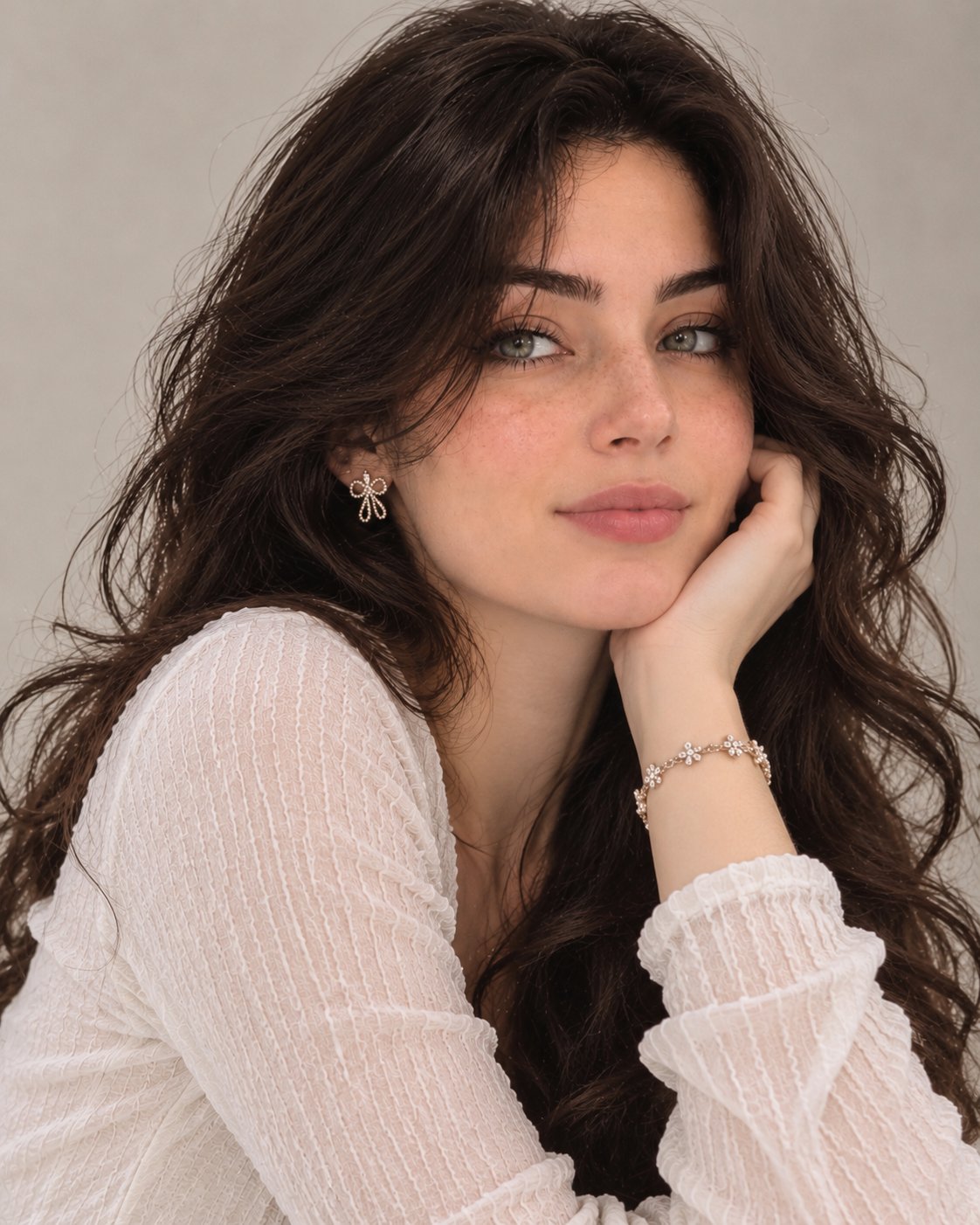
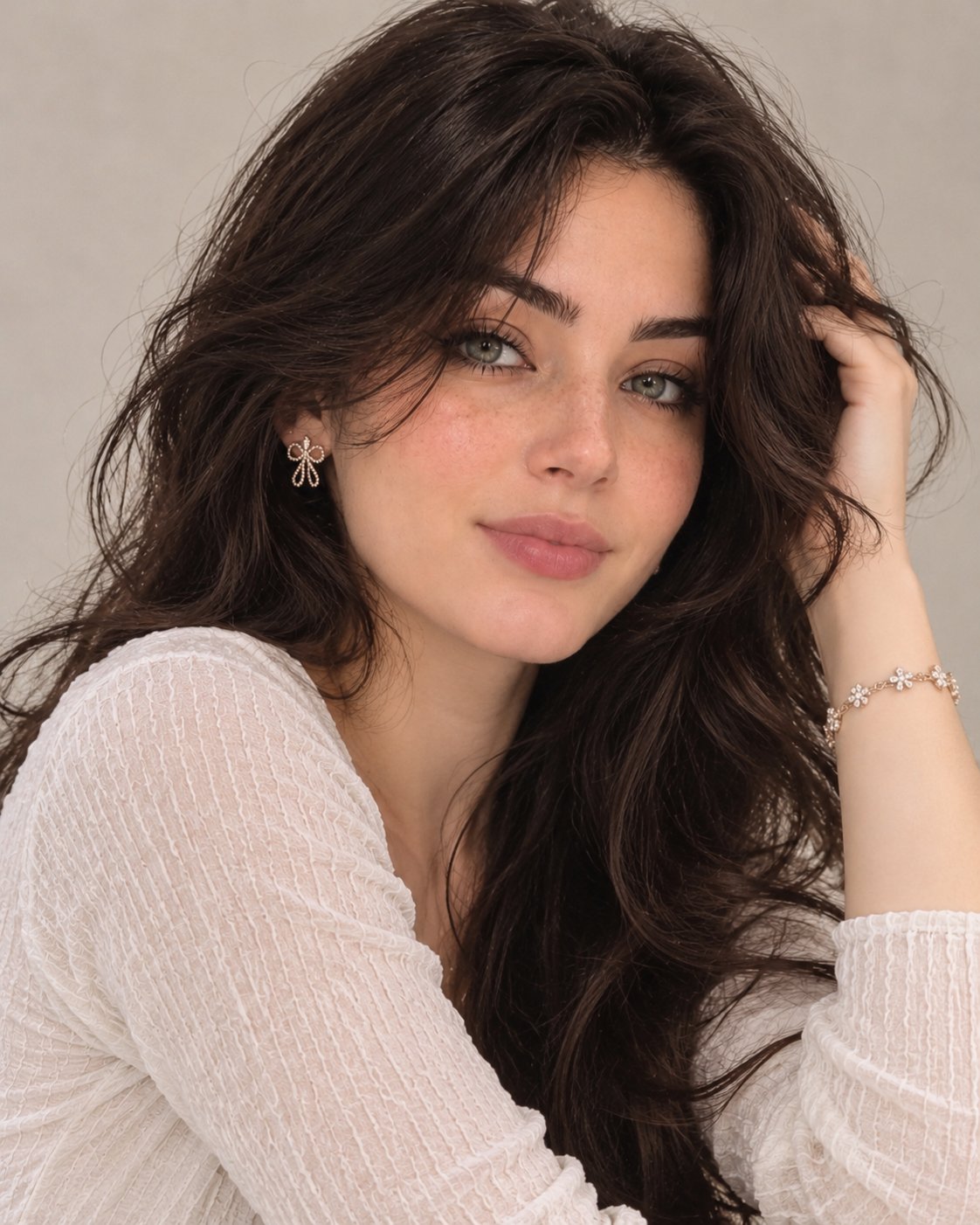
TWO-POSE EDITORIAL PORTRAIT SERIES.. Use the two uploaded images as the SEQUENCE 1 — ELEGANT CLOSE-UP POSE Create a stunning, ultra-realistic close-up portrait. The woman gently rests her cheek against one hand, with her elbow naturally positioned. Her head is slightly tilted, and she looks directly into the camera with a soft, confident expression and a subtle smile. Her beautiful wavy hair falls naturally around both shoulders. Capture delicate facial details, realistic skin texture, and naturally expressive eyes. SEQUENCE 2 — EFFORTLESS HAIR POSE Create a second individual portrait of the exact same woman. She gently raises one hand and runs her fingers through her voluminous hair, slightly tilting her head while looking directly into the camera. Her expression is effortlessly charming, confident, and feminine. Allow some natural hair strands to fall around her face. Keep the pose relaxed and editorial, like a candid moment captured by a professional fashion photographer. VISUAL STYLE & ENVIRONMENT - Plain warm beige or soft grey background. - No furniture, no props, no extra objects. - Soft natural studio lighting. - Premium European editorial photography aesthetic. - Professional DSLR photography. - 85mm portrait lens, shallow depth of field. - Natural skin texture, realistic hair strands and fine details. - Soft cinematic color grading. - Elegant, sophisticated and photorealistic finish. STRICT CONSISTENCY RULES 1. Both images must feature exactly the same woman. 2. Do not modify her facial identity or facial proportions. 3. Keep the exact same outfit and accessories. 4. Keep the same hairstyle, makeup, lighting and background. 5. Only change the pose, camera angle and natural facial expression. 6. Generate two separate portrait images, never a collage or a 3×3 grid. 7. Avoid artificial skin smoothing, excessive makeup, distorted hands and unrealistic facial features. FINAL RESULT: Two exceptionally beautiful, natural-looking, high-end editorial portraits that look like authentic professional photographs rather than AI-generated images.
Details
- Type
- AI Image Prompts
- Aspect Ratio
- 561:701
- Updated
- Nov 17, 2026
How to use this prompt
- 1Copy the full prompt with the copy button above.
- 2Open GPT Image 2.6 by OpenAI, or any image generator with a similar style range.
- 3Paste the prompt, then swap the subject and style keywords to match your idea.
- 4Match the example's settings (561:701 · Fashion · Realistic · Portrait), then iterate — small wording changes shift the output a lot.
Frequently asked questions
Which AI model generated this image?
This image was generated with GPT Image 2.6 by OpenAI. The prompt on this page is the exact text used to create it.
What settings does this prompt use?
The example was generated with GPT Image 2.6 using: 561:701 · Fashion · Realistic · Portrait. Reusing these settings gives the closest match.
How do I get similar results?
Copy the prompt as-is first, then replace only the subject while keeping the style, lighting, and composition keywords. Generate a few variations — outputs differ between runs.
Can I modify this prompt?
Yes. Prompts work best as starting points — adjust descriptors, aspect ratio, or style tags to make the output your own.