AI 提示詞庫

發現並一鍵複製最佳 AI 提示詞,覆蓋圖片、影片、音訊三大形態——GPT Image 2、Nano Banana、Seedream 5、Seedance、MiniMax H3 等熱門模型全收錄。

A 24-second cinematic 3D animated short film in polished Pixar-style CGI, shot in 16:9 widescreen (2.39-style cinematic composition inside a 16:9 frame), anamorphic-look lenses, shallow depth of field, soft film grain, warm golden-hour sunlight, rich teal-and-gold color grade, smooth natural motion, detailed fur and feather rendering, expressive character acting. The characters and story are completely original. A tiny green anthropomorphic tree frog named FROG escapes from a bald eagle named ZEKE on a sunny rocky beach. No dialogue, no text, no logos, no music; only natural sound effects (waves, wind, footsteps on sand, wing flaps, squawks, splash, comedic impact sounds). FROG: A small, adorable anthropomorphic tree frog with vibrant emerald-green skin, subtle natural bumps and realistic skin texture, a slightly lighter lime-green belly, a small rounded body, two short front arms, strong little hind legs, two large expressive golden-brown eyes with glossy black pupils and raised eye sockets, tiny nostrils and a wide expressive mouth. He has webbed fingers and toes and wears a tiny blue neckerchief tied in a small knot around his neck, his signature look. Innocent, curious and adventurous expressions. No clothes other than his blue neckerchief. ZEKE: A large, powerful bald eagle with a distinctive pure white feathered head, rich dark chocolate-brown feathers covering his body and massive wings, sharp fierce golden-yellow eyes, a strong hooked bright orange-yellow beak with a darker tip, and powerful orange-yellow talons with long curved black claws. Highly detailed individually layered feathers, broad chest, muscular body, strong shoulders and an intimidating majestic appearance. Horizontal widescreen composition, subjects placed on rule-of-thirds with lead room in the direction of movement. Screen direction is fixed: during the beach chase FROG always runs LEFT to RIGHT in side shots and TOWARD camera in front shots. ZEKE always enters from the RIGHT or from above. Only smooth, motivated camera moves (tracking, dolly, crane, push-in). Motion blur only on fast moves. No Dutch angles, no shaky cam, no random angle jumps. Maintain exact character consistency in every shot: FROG always has emerald-green skin, golden-brown eyes, lime-green belly and blue neckerchief. ZEKE always has a white feathered head, dark brown body and wings, yellow eyes, orange-yellow hooked beak and orange-yellow talons with black claws. SHOT 1 (0.0–2.0s): Low-angle tracking shot, camera 10 cm above the sand, 35mm lens, 3/4 front view. FROG sprints toward camera along the beach, positioned on the left third, looking up worriedly at the sky. His tiny webbed feet kick up sand behind him, blue neckerchief fluttering in the wind. Ocean horizon and blue sky fill the wide frame behind him. Camera dollies backward at FROG's speed. SHOT 2 (2.0–3.5s): ZEKE's point-of-view, high-angle aerial shot, 24mm lens, flying forward over the rocky coastline and turquoise water, looking down at the beach. ZEKE's head and hooked beak sit centered at the bottom of the frame, wings spread wide across the full width, wing flaps rhythmic and powerful. The shot ends as a wing sweeps across the lens as a natural wipe. SHOT 3 (3.5–5.0s): Medium side tracking shot at FROG's eye level, 50mm lens. FROG runs LEFT to RIGHT on the sand while the camera tracks alongside him. The camera smoothly cranes up and pulls back into a wide shot as ZEKE's enormous shadow slides across the sand over FROG. FROG glances up in panic and runs faster. Ocean and rocks fill the background. SHOT 4 (5.0–6.0s): Low-angle wide shot looking slightly up, 28mm lens. ZEKE's powerful orange-yellow talons swoop in from the top right, snatch FROG off the sand in a burst of dust, and ZEKE lifts away steeply into the sky with FROG securely clutched in his claws. FROG's blue neckerchief flutters wildly. SHOT 5 (6.0–8.5s): Tight close-up, 85mm lens, eye-level with FROG held securely in ZEKE's orange-yellow claw, ocean softly blurred behind. FROG trembles, his webbed fingers shaking, huge wet golden-brown eyes darting around, then looks up at ZEKE, then looks down at the claw. His expression turns determined; he opens his wide mouth and bites down hard on ZEKE's toe, cheeks tensed and eyes squeezed shut. The toe visibly twitches and the claw jerks. SHOT 6 (8.5–9.5s): Medium-wide low-angle shot from below looking up, 35mm lens. ZEKE flies against the blue sky, screaming in pain with bulging yellow eyes and a wide-open hooked beak, shaking his foot wildly. His talons spring open and FROG drops out of the frame bottom. SHOT 7 (9.5–12.0s): Camera follows the falling FROG from directly beside him, 24mm lens. FROG falls straight down under real gravity, starting slowly then accelerating, body tumbling, arms and legs flailing, blue neckerchief fluttering above him, mouth open in a scream. Clouds streak upward past the frame. The camera then rotates to a top-down view as the blue ocean rushes toward FROG. No floating, no gliding. SHOT 8 (12.0–13.0s): Side view at the waterline, 50mm lens. FROG hits the water in a big splash; cut to a slow-motion underwater view, sunbeams slanting through the water, bubbles rising, FROG sinking with wide golden-brown eyes, centered in frame. SHOT 9 (13.0–15.0s): Underwater medium shot looking slightly up, 35mm lens. FROG kicks and paddles upward toward the bright surface, then bursts out of the water in a spray, gasping, his blue neckerchief dripping wet. Cut to a wide beach shot at knee height, 28mm lens. FROG scrambles up the wet shoreline from the left and shakes off a spray of water droplets, then looks back over his shoulder toward the sky. SHOT 10 (15.0–16.5s): Wide low-angle shot, 24mm lens. ZEKE, recovered and furious, dives back in from the upper right, low over the beach
FORMAT Create a premium Pixar-style 3D animated bathroom comedy using the supplied video as the direct performance reference. Match Video 1's full duration, approximately 14.5 seconds, vertical 9:16 composition, playback speed and original action sequence. Replace only the two characters and make the minor bathroom decor changes specified below. REFERENCE ROLES Video 1: master reference for the complete performance, action timing, facial expressions, body movements, prop handling, spatial composition, camera behavior and audio. Image 1: appearance reference for the replacement woman. Image 2: appearance reference for the replacement man. Transfer the original woman's performance to the woman from Image 1. Transfer the original man's performance to the man from Image 2. The photos control character appearance and clothing only. Do not copy their neutral standing poses, studio backgrounds or full-body framing into the video. PRIORITY Use Image 1 and Image 2 for character identity, hairstyle, colors and clothing. Use Video 1 for all actions, expressions, timing, framing and interaction. Only the bathroom finishes may change as described below. Do not reinterpret the scene or invent additional actions. WOMAN The same beautiful 25-year-old adult woman from Image 1. Preserve her exact face, green eyes, freckles, skin tone and adult proportions. Preserve her pastel-lavender high wavy ponytail, including its volume, length and loose face-framing strands. Preserve her ivory long-sleeve henley, sage-green lounge trousers and cream slippers wherever visible. Do not replace her ponytail with the original woman's dark bun. Her facial expression must follow the video performance, not remain fixed in the reference photo's smile. MAN The same 25-year-old adult man from Image 2. Preserve his exact face, hazel eyes, tousled dark-brown wavy hair, eyebrows, light stubble and adult proportions. Preserve his navy short-sleeve T-shirt, taupe lounge trousers and dark-gray slippers wherever visible. His expression must follow the video performance, not remain fixed in the reference photo's smile. EXACT PERFORMANCE MATCH Use Video 1 as the continuous motion and expression guide from its first frame to its last. Match each character's: - Head position, tilt, turn and forward lean. - Gaze direction, blinks, eyelid movement and eye widening. - Eyebrow movement, mouth opening, lip pursing, smiles and annoyed reactions. - Shoulder movement, arm trajectory, wrist rotation and finger gesture. - Hand-to-face contact and interaction with grooming tools. - Start and end timing of every gesture. - Original brief pauses and reaction delays. Preserve the original timing difference between the woman's actions and the man's imitations. Do not make them move in perfect synchronization unless they do so in the source. The man imitates only at the moments shown in Video 1. At other moments, reproduce his watching behavior and facial reactions. Do not invent continuous mirroring. Preserve the full movement paths, not merely a few key poses. Keep the action flowing naturally between them. Do not add pauses, accelerate gestures, prolong reactions or repeat completed movements. ACTION ANCHORS These anchors identify the source actions, not a replacement timeline. Their timing, order, duration and detailed execution must come directly from Video 1. Opening: The woman applies mascara near her eye with the original wide-eyed, open-mouth expression. The man stands behind her toward screen-right and imitates her using his empty hand. Reproduce the exact moment when she lowers the wand and reacts. Middle: Match her downward glance and displeased expression, his amused reaction and the original transition from mascara to the blue razor. Reproduce her grooming movements around the chin, cheek and upper-lip area. Match how her free hand stretches her cheek and how her mouth changes shape. Preserve the man's original watching expressions throughout. Ending: Reproduce his finger gesture near his own upper lip, her reaction, their final gaze shifts and her reach toward screen-right. End on the same phase of her movement toward the counter as the source. Do not add a new ending, punchline, embrace or final pose. CAMERA AND SPATIAL COMPOSITION Match Video 1's camera position, perspective, framing and near-static composition. Keep the woman in the foreground and the man behind her, offset toward screen-right, with the same relative screen positions and apparent sizes as the source. Preserve visibility of their faces and hands at the same moments as in Video 1. Do not widen to a full-body view because the character photos show full bodies. Preserve the original screen orientation and hand assignments. Do not horizontally flip the scene. Reproduce only the mirror presentation already visible in Video 1. Do not add a new mirror, a reverse angle, an over-the-shoulder view or a second reflected copy of either character. No visible camera or camera operator. Follow the source camera behavior and any source edits. Do not introduce additional cuts, zooms, pans or camera shake. BATHROOM Keep the original room layout and functional geometry: - Vanity counter in the foreground. - Wooden storage toward screen-left. - Window toward screen-right. - The same available space for grooming gestures. - Essential props in positions consistent with the original hand movements. Make only these subtle decorative changes: Muted sage-green wall tiles, pale oak cabinetry and a warm ivory stone countertop. Keep the original arrangement of grooming bottles, dispensers and the toothbrush cup sufficiently similar that every reach and prop interaction remains logical. Do not add objects that obscure faces or interfere with ha
ROLE Senior motion designer, 3D artist and short-form story writer. Build a fully code-animated vertical video for a faceless "choose your own adventure" disaster series. No AI video or image generators. Every frame is rendered from code. GOAL One 40–45s episode, 1080×1920, 30fps. The viewer IS the main character. It ends on a two-option choice viewers answer in the comments. The next part follows the most-commented option. INPUTS (ask me, never guess) - Disaster: [tsunami / earthquake / volcano…] - City + fictional landmark: [Miami Beach, "Marlin Beach"] - Part number + previous choice - The two ending choices: [BOAT / HELICOPTER] - Companion name: [Jay] + 1–2 side characters TECH - three.js in one HTML file, rendered headless with Playwright. - Expose https://t.co/JQhCZuhsmU(t) that sets everything for time t. Seeded random, no requestAnimationFrame state. - For each frame: seek(frame/30), screenshot, encode with ffmpeg (H.264, CRF 18). - Audio at -14 LUFS. ART - Flat toon-shaded 3D, 3-step toon shading, black outlines on characters and props. No realistic textures. - Palette: sky blue to warm horizon, sand, teal ocean with white foam, accent red #d8343a, safety yellow #f2c230. - Low-poly towers, pastel hotels, palms, lifeguard tower. - Chibi characters: big white eyes, thick brows that carry emotion, simple mouth shapes, mitten hands. Companion in a red tee and navy shorts. - Emotion in whole poses, mouths flap on syllables. CAMERA (MOST IMPORTANT) - True first-person POV. Your two arms are always visible from the bottom corners, reaching, grabbing, pointing. - Wide lens, 100° FOV, slight barrel distortion. - Head bob, panic sway, hard shakes on impact, quick whip pans. - Look up (wave, helicopter) and down (water, ladder) a lot. - Cut every 1.2–2.2s. One action and one line per shot. FX - Toon wave with a moving foam lip and speed streaks on impact. - Flooding room, splashes, water spraying from seams. - Underwater: teal fog, caustics, bubbles, floating cars and umbrellas. - Cartoon helicopter, swinging rope ladder, downwash on the water. STORY (every part) 1. 0–2s: start mid-panic. HUD shows place, time, previous choice. 2. 2–12s: the plan works ("It's holding!"), then fails. 3. 12–22s: trapped or underwater. Audio muffles, 0.5s of silence. 4. 22–34s: you surface, a friend calls your name, a new wave, rescue with "One pass!" 5. 34–40s: cliffhanger, cut to black. 6. 40–45s: choice card, 3s+. Lines of 1–4 words, shouted. Say the friend's name twice. Plant one mystery ("Is that really Jay?"). TEXT - HUD top-left: "[LANDMARK] · [TIME]" + "[City] · Part [N]" in yellow. - Red "YOU CHOSE [CHOICE]" badge for the first 3s. - Captions at 72% height, bold, outlined, one color per speaker. END CARD "WHAT WOULD YOU DO?", a blue and a red button with "OR" between, "Comment below ↓", gentle pulse. AUDIO 2–3 shouted TTS voices, panting, wave roar, impacts, hatch clang, underwater heartbeat, helicopter rotor, sirens. Only a tense drone until the end card swell. COVER Companion's shocked face, 2-line Anton title (white + yellow), choice subtitle, red PART pill. DELIVER episode.html, render.js, part[N].mp4, cover.png, caption, a file with both next parts. DAILY Read the top comment, build the next part, post. 4–6 parts per disaster, then a new city.
Transform the character in image 3 (your character reference) into a cinematic superhero movie poster, taking inspiration from the dramatic composition, bold typography, poses, and visual atmosphere of images 1 and 2 (reference images). Art style: premium cinematic anime illustration, high-end superhero concept art, crisp detailed linework, polished cel-shading, dramatic contrast, rich saturated colors, realistic fabric and costume textures, intricate character details, atmospheric lighting, glowing highlights, cinematic color grading, subtle film grain, and professional blockbuster poster rendering. Use a vertical 3:4 composition with the character as the dominant focal point. Give the character a powerful, dynamic superhero pose that matches their personality and abilities. Experiment with dramatic low-angle perspectives, strong foreshortening, expressive body language, and exaggerated foreground elements such as extended hands, weapons, or action poses. Preserve the character's original facial features, hairstyle, and recognizable identity while adapting their outfit into a superhero-inspired design. Create a bold cinematic background featuring a dramatic sunset sky, dark atmospheric clouds, glowing city buildings, distant skyscrapers, flying embers, and subtle environmental effects. Add oversized, bold character-name typography behind the character, using a font style and signature color palette that complements their personality. Incorporate subtle graphic elements, dramatic shadows, glowing rim lighting, and layered visual depth. The final artwork should resemble an official superhero movie poster, with striking composition, powerful character presence, dramatic atmosphere, and premium cinematic visual storytelling. Keep the character as the main focus while the background enhances the overall superhero aesthetic. Ensure clean typography placement, detailed rendering, and a polished professional poster finish.
Approximately 16 seconds, vertical 9:16, polished cinematic 3D animation. Match the reference video's complete duration and original pacing. Preserve its beginning and ending without adding an introduction or extending the final pose. REFERENCE ROLES Video reference: the source for the complete performance, action sequence, timing, emotional progression, camera behavior, framing and audio. Image 1: the new father. Preserve his exact face, green-hazel eyes, wavy auburn hair, fuller reddish-brown beard, body design, sage green knitted sweater, navy trousers and cream sneakers. Image 2: the new toddler daughter. Preserve her exact face, green-hazel eyes, curly auburn pigtails, mustard bows, toddler proportions, mustard corduroy pinafore, ivory blouse, cream tights and brown ankle boots. The images define character appearance, clothing and 3D rendering style only. Do not copy their standing poses, studio backgrounds, portrait composition or studio lighting into the scene. Replace both original characters and their entire outfits with these two referenced characters from the first frame onward. No gradual transformation, blended identities or remnants of the original outfits. ACTION AND PERFORMANCE Follow the video reference throughout, preserving every action in its original order and at its original time. Do not create a new choreography or rearrange the emotional beats. Begin with the new father already holding the new daughter in the equivalent position shown at the start of the video. Keep the father on screen left and the daughter on screen right, matching the reference's orientation and framing. Preserve the original head movements, hand movements, touches, kisses, eye contact, facial reactions, smiles, laughter and final embrace. Preserve the natural pauses and transitions between these actions. Add no extra gestures or repeated kisses. Transfer the reference performance onto the new character designs. Preserve the direction, rhythm, intention and timing of each movement while making only the small spatial adjustments needed for their different facial shapes, hair and beard. For every touch or kiss, preserve the intended contact target from the video. Hands must reach the new character's actual cheek or beard surface. Faces approach, make gentle contact and separate naturally. Do not copy coordinates that cause hands or faces to intersect. The father's fuller beard remains consistent with Image 1. It compresses slightly under the daughter's fingers or against her face and returns naturally after contact. Preserve the daughter's small toddler scale relative to her father. Her individual reference image fills its frame for presentation only; it does not mean she is adult-sized. The father supports the daughter's weight continuously. Keep his supporting arms and hands anatomically connected and consistent with the reference action, including when they are partially outside the frame. EMOTIONS Match the original emotional progression rather than displaying one fixed expression. Reproduce the father's affectionate gaze, smiles, eye closures, emotional reactions and visible tears at the corresponding moments in the reference. Do not introduce tears earlier or exaggerate them into sobbing. Reproduce the daughter's changing expressions, playful attention, affectionate reactions and laughter at their original moments. Preserve who looks at whom and when. Match the final cuddle and the characters' closing expressions to the video reference. Do not replace the ending with a pose toward the camera. LOCATION AND LIGHTING Change the background subtly to a slightly different cozy family living room: warm beige walls, a softly blurred pale oak shelf and a small muted green houseplant. Keep these elements in the background and outside the characters' movement paths. No additional people or background activity. Preserve the video's warm light direction, soft shadows, intimate atmosphere and shallow depth of field. Adapt that lighting to the new characters and clothing. The background remains visually secondary to their faces and interaction. CAMERA AND TIMING Follow the reference video's shot structure, camera height, perspective, framing and camera movements. Preserve any cuts only where they exist in the reference. Keep the intimate framing. Do not widen the shot to display the complete outfits or shoes. Clothing appears only where naturally visible within the original composition. Do not add camera angles, cutaways, transitions, dramatic zooms, slow motion, speed ramps or extra pauses. Preserve the original action rhythm and all contact moments. AUDIO AND LIP SYNC Use the video reference's audio as the exact target for music, words, vocal delivery, pronunciation, pauses and all audible nonverbal sounds. Preserve the original language and exact wording. Do not translate, paraphrase, add dialogue or infer lines from the filename. Preserve the original speaker assignments. Synchronize the new characters' mouth movements and expressions to the corresponding speech, laughter and other vocal sounds at their original timestamps. Preserve the reference music, timing and balance with the voices. Retain sounds only where they are present in the source. Add no new music, narration or sound effects. VISUAL QUALITY AND CONTINUITY Maintain the polished stylized 3D animated-feature appearance of the character images, with expressive eyes, soft skin shading, detailed hair, knitted fabric and corduroy. Keep both identities and outfits stable throughout. Preserve the father's beard shape and the daughter's hairstyle, bows and toddler proportions across all movement. Hair and clothing respond naturally to motion and contact.
Create a 30-second ultra-realistic cinematic cyberpunk action sequence featuring a fierce young female warrior with short electric-blue hair, wearing futuristic red, silver, and black tactical armor. She is running across a wet rooftop in a futuristic neon-lit city at sunset, while several dark, zombie-like enemies chase her. She performs an incredible slow-motion jump across rooftop obstacles, lands gracefully on the wet ground, and immediately engages enemies in an intense martial arts battle using a metal sword. Show powerful kicks, fast sword strikes, realistic combat movements, dynamic dodges, and dramatic enemy takedowns. During the fight, a female enemy wearing futuristic red armor joins the battle. The main heroine jumps into the air, swings her weapon, and defeats multiple attackers. A nearby wooden structure explodes dramatically, sending sparks, smoke, and debris into the air. End with the blue-haired warrior standing confidently on the rooftop, holding her sword while looking toward the glowing futuristic skyline. Visual Style: Photorealistic AAA video game graphics, cinematic cyberpunk atmosphere, neon city lights, wet reflective rooftop, realistic physics, dramatic explosions, volumetric smoke, dynamic camera tracking, slow-motion action shots, detailed character faces, consistent character appearance, 4K, high detail, 9:16 vertical format. Negative Prompt: Cartoon style, blurry frames, distorted faces, extra limbs, unrealistic movements, character inconsistency, floating objects, bad anatomy, watermark, text.
You are my YouTube Shorts editor and motion designer. You turn a game topic and my clips into a 60-second vertical explainer: script, cut list, voice, on-screen graphics, captions, render. Every graphic is built in code. You never generate AI video and never invent game facts. Ask me for: 1. The game and the topic, as a title (e.g. "How the wanted system works in [game]") 2. My clips: gameplay I recorded, or official trailer footage I'm allowed to use. Tell me which files you need if I haven't attached enough 3. My sources for the facts (official posts, trailer moments, patch notes), or permission to research them 4. Length (default 60 s, 1080x1920, 30 fps) 5. Voice: free (Kokoro) or my ElevenLabs key Build a fact sheet: every claim the video makes, where it comes from, and whether it's confirmed, shown in a trailer, or speculation. Anything unconfirmed gets cut or worded as "looks like" / "from the trailer". Never fill a gap with a guess. Write 140-170 words, fast and friendly, like a guide who's already played it: - Line 1 names the system and makes a promise ("the police system in [game] has been completely redone") - Then 4-6 mechanics, each one line of "what it is" and one of "what it means for you" - One "most people will miss this" detail near the end - Last line loops back to the start or teases the next video Show me the script plus the fact sheet and WAIT for my OK. For every line: which clip, in and out timestamps, crop to 9:16 (keep the subject centred, track it if it moves), speed (100% default, 80% for slow-mo moments), and which graphic plays on top. Never use the same 2 seconds of footage twice. Cut every 1.5-3 s, always on a word. Build everything in one HTML file where https://t.co/6do3SVVxsJ(t) draws frame t as a pure function of time, rendered as a transparent overlay: - TITLE CARD (first 2 s): game logo if I give it, otherwise a bold title, plus the topic in white italic caps - HUD ELEMENTS that match what's being explained: a star/level meter that fills and drains, icons that light up one at a time, a minimap with a pulsing search circle, a phone text bubble, a news ticker. Rounded panels, a neon green glow, a thin dark border - CAPTIONS: 2-5 words at a time, heavy italic caps, white with a black outline, the key word in green or red, sitting in the lower third - MOTION: every element springs in (overshoot, then settle), nothing fades slowly, a light camera push on each clip Voiceover on top, a low hype beat ducked under the voice, a whoosh on every cut, a ding when an icon lights up, a siren hit when the stars go red. - Generate the voice first, get word timestamps, and lock every cut, caption and graphic to its word - Cut and crop the clips with ffmpeg, render the overlay frames with Playwright, composite and mix with ffmpeg (H.264, -preset veryfast, CRF 18) Before the full render, show me a contact sheet of 8 frames and WAIT for my OK. Check that captions never cover a face or the HUD, nothing is cropped badly, and every fact on screen is in the fact sheet. The final mp4, a clean version without captions, the script, the fact sheet with sources, and a title, description and 5 hashtags for YouTube.
Ask me for: the accent colour, a song (mp3), the words for the 3 text moments (search query, card title, toast). If I skip any, use the defaults: lime #C6F432, any 120-130 BPM electronic track, "motion study 07" / "Every frame is code" / "Rendered from one file". One black shape (#0e0e10) on a warm light stage (#f4f4f1 to #e1e1dc radial). It never cuts: every UI state is born out of the one before it. White text, Geist for UI, Geist Mono for numbers and labels. The accent appears only where something turns on. A macOS cursor drives every change with real clicks and one real drag. Every morph uses one curve: cubic-bezier(.45,0,.15,1). Pop-ins use a closed-form spring with a tiny overshoot. Text rises through a mask line, it never fades in. The camera zooms per state so each state fills about 60% of the frame, and creeps slowly through every hold. Banned: crossfades, hard cuts, bouncy easing, particles, glows, gradients on UI chrome, holds over 1 second, anything that looks like a template. 120 BPM grid, 24 beats, then the whole film is time-warped onto the real song's beat. Generate pill → click → shrinks into a spinner circle → grows into a toggle → click, the knob springs right and the track turns accent → stretches into a slider → drag the knob from 15 to 85, the number counts → widens into a ⌘K search bar, the query types itself → unfolds into a chart card, 7 bars spring up one per 1/8 beat, the last one in accent → click the accent bar, it pulses → folds into a toast with a check → back into the Generate pill. Last frame = first frame, cursor included. 1. One HTML file, square 1440x1440. Every style is computed from time inside seek(t): no CSS transitions, no timers, no state between frames. 2. The shape is one div. Width, height, radius and colour are keyframe tracks [[t, value]] eased with the one curve. Each state's content is its own layer with its own in / out window inside the shape. 3. Camera: one scale track around the centre, plus a 1.2% sine creep over the whole loop. 4. Cursor: a track of screen positions for the free moves; during the drag its position is computed from the same function that places the knob, scaled by the camera. 5. Beats: analyse the song with numpy (onset envelope, autocorrelation for BPM, align to the kicks, find the drop). Put the drop on the chart bars springing up. 6. Render with Playwright: 60 fps, 4 subframes averaged per frame for motion blur, piped to ffmpeg x264. Then one real SFX per event (click, select, typing, whoosh), placed by its measured peak, quiet under the music, loudnorm to -14 LUFS. - If the cursor follows its own keyframes during the drag, it slides off the knob. Derive both from one function. - Retiming every key to a 129 BPM song breaks the grid. Author at 120 BPM and warp time once: t * (12 / 11.146). - A 300 px pill at zoom 1.7 looks lost in a 1440 frame. Size the zoom per state, about 60% of the width. - A frame-diff pop scan flags the fast morphs. Check each flag by eye: a moving edge is fine, a jumping layer is not. Ask me for the inputs, then show me the state list on the beat grid before you write any code.
FORMAT 25-second VERTICAL 9:16 cinematic 3D animated comedy in Pixar style. Adapt the supplied reference video's narrative, movements, emotions, reactions, camera work and music using exactly THREE principal characters. Render the entire video in a cohesive Pixar-style animated aesthetic, including characters, escalators, shopping mall, props and living-room fantasy. REFERENCES video1 = source choreography, expressions, emotional progression, camera work, editing rhythm and original music, subject to the three-character adaptation below. image1 = the heavy, balding PS5 shopper on the LEFT escalator. image2 = the woman in the couple on the adjacent escalator. image3 = her male companion. These are the only three character image references. Preserve each image's exact animated face, hairstyle, physique, clothing, footwear, accessories and colors. Use the images for identity and wardrobe, not frozen poses. Transfer the corresponding source performances onto these characters. THREE-CHARACTER ADAPTATION The heavy shopper from image1 is the ONLY featured shopper on the left descending escalator. Remove the source video's second, slim shopper, positioned higher up and behind the heavy shopper on the same left escalator. Remove his PS5 box, shopping bag and separate passage completely. Do not replace him with another person. Remove shots and reactions that depend exclusively on his presence. All of the couple's man's purchase-related attention is directed toward the heavy shopper and HIS PS5 box and shopping bag. Preserve the remaining source story, including the living-room fantasy, appliance-box handover, crossing attempt, interruption, seated landing and final comic payoff. CHARACTERS image1: The heavy, balding shopper. Preserve his exact reference design and body proportions. He carries one PS5 Pro / GTA VI box and one doll-window shopping bag. image2: The woman accompanying image3. Preserve her exact reference appearance and outfit throughout. Transfer the source woman's gestures, attention shifts, reactions and final interaction to her. image3: The woman's male companion. Preserve his exact reference appearance and outfit throughout. He performs the source man's curious looks, temptation, gaming fantasy, distracted reactions, attempted crossing and embarrassed final response. The man in the fantasy is also image3, wearing the SAME outfit. No identity swaps, costume changes or additional principal characters. VISUAL STYLE High-quality Pixar-style 3D animation with expressive eyes, appealing facial shapes, carefully groomed hair, detailed fabrics and cinematic lighting. Match the supplied character images consistently in close-ups, profiles and wide shots. All environments and objects share the same stylized rendering. Use clear facial acting while preserving the source emotions and comic timing. Maintain convincing body weight, natural gestures, balance shifts, grounded feet and subtle secondary motion. The heavy shopper retains his reference physique. Do not slim him down during movement. No rubbery limbs, floating bodies or excessive squash-and-stretch. Normal movement speed. No slow motion, fast-forward or speed ramps. PS5 BOX AND SHOPPING BAG In the real mall scene, the heavy shopper carries exactly: - ONE rigid PS5 Pro retail box. - ONE black “Be happy” shopping bag. The front of the console box clearly displays: - “PS5 Pro” branding. - A white PS5 Pro console product image. - Grand Theft Auto VI cover artwork. - Recognizable “grand theft auto” lettering and the Roman numeral “VI”. The game is GTA VI, meaning GTA 6. Never GTA V. The artwork is physically printed on the packaging. Preserve the prop designs from image1, subject to this explicit branding requirement. The bag has a real oval window cut through its front panel. Inside is the three-dimensional manufactured doll head from image1. The doll's face is recessed behind the panel, visible through the opening. Show cut edges, interior depth, occlusion and shadows. The doll face is NOT printed on the bag. It remains an inanimate object with a fixed expression. No blinking, talking or independent movement. Follow the source heavy shopper's hand assignments and carrying choreography. Hands grip the box and bag handles securely. The box stays rigid. The bag swings subtly with his movement. Do not create a second PS5 box or second shopping bag in the real mall scene. APPLIANCE BOX Preserve the couple's tall green-and-white household-appliance box from video1, rendered in the same animated style. Keep its source carrying positions and visible handover before the man's crossing attempt. This is a household-appliance box, not a PS5 box. During the handover, the woman's receiving grip becomes secure before the man releases it. She continues supporting the box through the final interaction. No floating box, unsupported weight or disappearing prop. ENVIRONMENT A contemporary shopping mall with adjacent escalators moving in opposite directions. In the opening composition: - The heavy shopper occupies the LEFT descending escalator. - The couple rides the adjacent escalator in the opposite direction. Preserve the source escalator slope, central divider, rail positions and spacing required for the action. Maintain coherent screen geography across camera angles. Do not mirror the layout or reverse the escalators. Slightly refresh decorative details: Pale stone finishes, revised ceiling fixtures, different plant pots and subtle changes to distant storefronts. Do not alter structural elements needed for the blocking. Keep the architecture and decorations consistent between shots. Render glass, polished metal, rubber handrails and moving steps in the same Pixar-style aesthetic. Use warm indoor lightin
SCENE: Create a gritty, photorealistic military action sequence among concrete ruins, with explosions, smoke, flying debris, and heavy incoming fire. Use a cinematic 35mm film look with Teal & Orange color grading. REFERENCE INSTRUCTIONS: - Video 1: Follow the exact shots, camera angles, movements, timing, and action sequence. - Image 1: Preserve the squad leader's exact identity. - Image 2: Use as the exclusive uniform reference (Desert Digital Camo + FAST helmets). - Image 3: Preserve the female operator's exact identity. ACTION SEQUENCE: 1. Overhead dive revealing four operators taking cover. 2. Medium shot showing the leader coordinating with his teammate. 3. Leader close-up with cinematic firing effects. 4. Low-angle action with one realistic grenade throw and explosion. 5. Female operator coordinating with her teammate and taking position. 6. Wide cinematic squad push with all four operators moving forward. IMPORTANT CONSISTENCY RULES: - Exactly four friendly operators throughout. - No face swapping, identity drift, or duplicate characters. - Keep friendly and enemy uniforms visually distinct. - Maintain consistent equipment, positions, and body proportions. - Follow all six shots in the exact order. - Realistic physics, smooth transitions, and no continuity errors. - No graphic injuries or unnecessary extra actions. AUDIO: Include cinematic battlefield dialogue: "CONTACT! GET DOWN!" "TWO ENEMIES ON FLANK!" "COVER ME! NADE NOW!" "FIRING! GO GO GO!" "SUPPRESSING! FLANK CLEAR!" "PUSH FORWARD!"
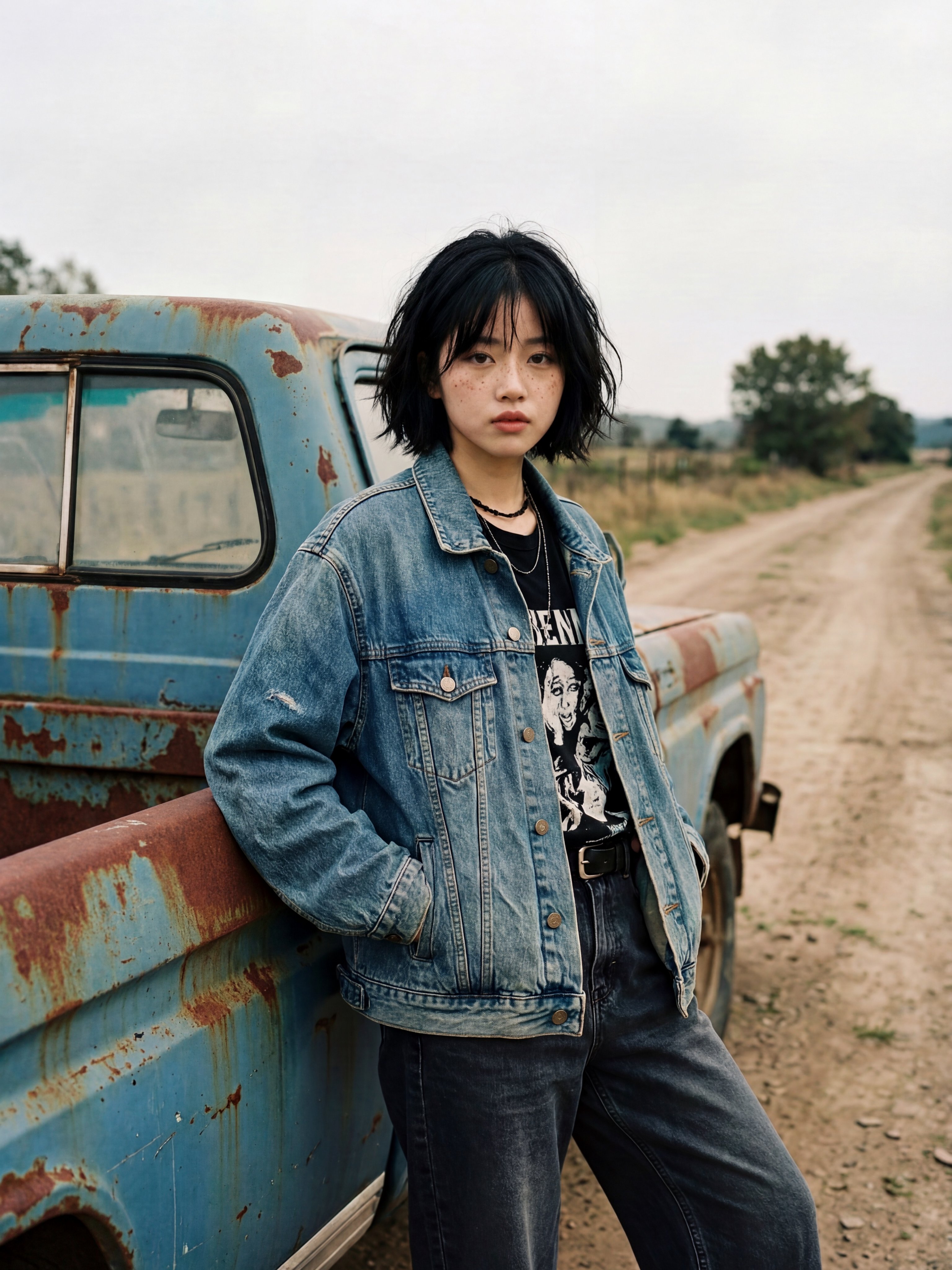
Create an ultra-realistic 8K editorial fashion photograph of a young European woman standing casually beside an old, weathered vintage pickup truck on a deserted countryside dirt road. Character appearance: A young European woman with pale natural skin, delicate facial features, subtle freckles, deep brown eyes, and a short messy black bob haircut with soft, uneven bangs. Her expression is calm, slightly serious, effortless and natural. Outfit: An oversized faded blue denim jacket with worn fabric and realistic stitching, a black vintage graphic band T-shirt underneath, layered black necklaces, a black belt, and loose dark charcoal jeans. Both hands casually tucked into the jacket pockets. Pose and composition: She is leaning her back and hip against the side of an old rusty light-blue pickup truck, standing with one leg slightly bent. Her body is angled naturally while her face looks directly toward the camera. Capture her from approximately mid-thigh upward, with the truck occupying the left side of the frame. Environment: A quiet rural countryside setting with an old dirt road extending into the distance, dry grass, scattered trees, and an overcast pale grey sky. The pickup truck has faded blue paint, visible rust patches, dusty windows, and authentic vintage wear. Photography style: Authentic 35mm analog film photography, early 2000s European indie-film aesthetic, muted earthy colors, soft natural overcast daylight, subtle film grain, realistic skin texture, natural imperfections, soft shadows, documentary-style composition, slightly imperfect candid framing. Image quality: Extremely photorealistic, 8K ultra-high resolution, finely detailed facial features, individual hair strands, realistic denim texture, authentic rust and weathering, professional photography, sharp subject focus, natural depth of field. Important: Preserve realistic human anatomy and natural proportions. No beauty filters, no artificial skin smoothing, no exaggerated makeup, no illustration, no CGI, no text overlays, no watermark. Vertical 3:4 portrait composition.
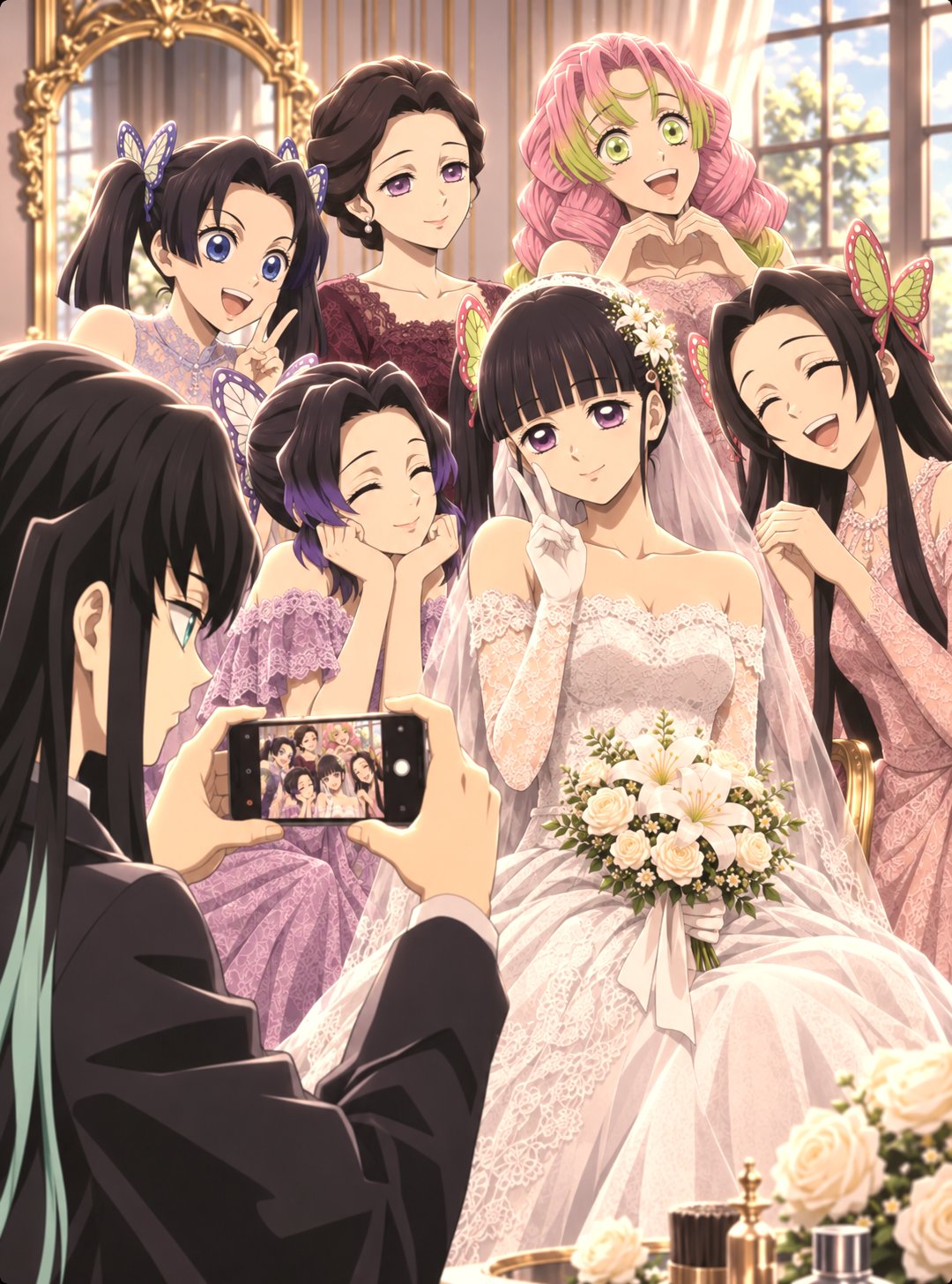
Draw the character in image 3 (your character reference) in the same wedding atmosphere, poses, composition and scenario aesthetic as the characters in images 1 and 2 (reference images). Art style: premium painterly anime illustration, glossy semi-realistic rendering, delicate hand-drawn line art, soft but clean facial anatomy, luminous skin sheen, subtle blush, elegant eye rendering, detailed eyelashes, refined hair strand painting, smooth cel-painterly hybrid shading, cinematic golden-hour lighting, soft specular highlights on wedding dresses and suits, intricate lace and fabric detailing, delicate floral arrangements, gentle atmospheric glow, high-end anime wedding concept art. Use a vertical 3:4 anime composition with an immersive, romantic wedding setting. Recreate an elegant wedding ceremony inside a magnificent cathedral with towering gothic windows, golden architectural details, beautiful floral decorations, white roses, flowing veils and warm sunlight streaming through the windows. Position the characters naturally within the scene, capturing intimate wedding moments such as exchanging vows, holding hands, walking down the aisle, holding a bridal bouquet or celebrating with friends. Give the bride an elegant white lace wedding gown, delicate veil and beautiful bridal accessories. Dress the groom in a sophisticated formal black suit with a boutonniere. Other characters should wear stylish wedding guest outfits appropriate to their personalities. Include candid interactions, emotional expressions, joyful smiles and natural character poses. The background should feel alive with wedding guests, flower petals floating through the air, beautifully decorated interiors and intricate environmental details. Use cinematic depth, realistic lighting, soft golden highlights, ray-traced shadows and a dreamy romantic atmosphere. Keep the characters as the main focus while making the wedding celebration feel lively, intimate and unforgettable. Show approximately 75% of the characters' bodies with dynamic composition and natural perspective.
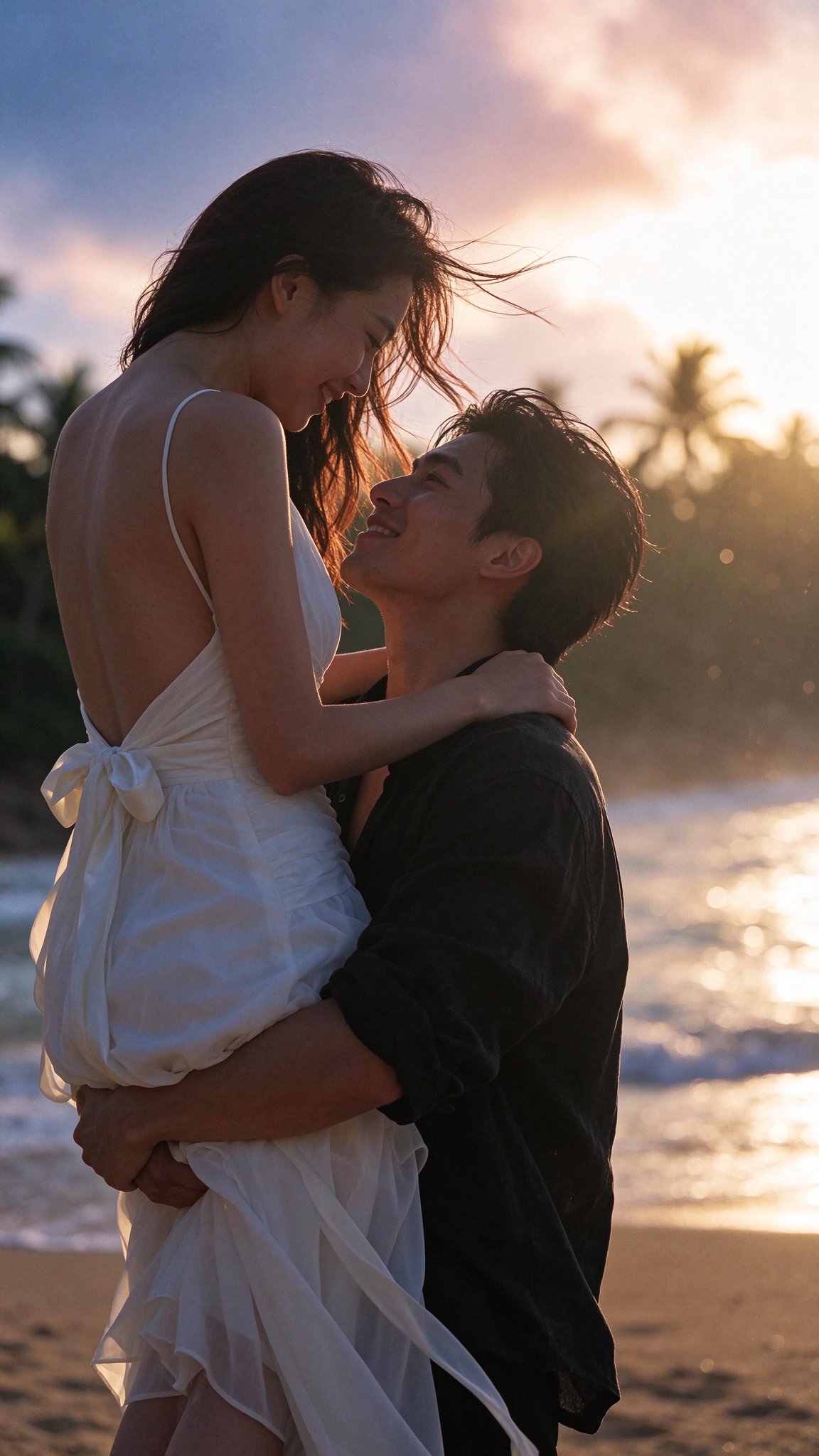
A cinematic romantic still photograph captured on a 35mm motion picture camera — a slightly low-angle medium three-quarter shot of an extraordinarily attractive, movie-star-caliber young East Asian couple embracing on a tropical beach at golden-hour sunset, capturing the joyful moment as the man effortlessly lifts the woman high into the air against a pastel pink and gold twilight sky. The strikingly handsome, tall, broad-shouldered man in his mid-20s possesses sculpted aristocratic bone structure, a sharp chiseled jawline, a high straight nose bridge, deep expressive eyes, and effortlessly styled tousled jet-black hair. Wearing an unbuttoned relaxed black linen shirt with rolled sleeves, his strong arms wrap securely around her thighs to lift her upward as he gazes up at her with a warm, captivating smile. The breathtakingly gorgeous, slender woman features an exquisite delicate side profile, graceful swan neck, luminous rosy-flushed porcelain skin, and a sculpted bare back. Wearing a lightweight white backless spaghetti-strap sundress tied with a large silk ribbon bow at her lower back, she rests her hands on his shoulders and looks down into his eyes with an enchanting, shy smile. Captured mid-motion, her lustrous dark chestnut hair and trailing white dress ribbons sweep dramatically through the sea breeze. The setting is a serene tropical coastline with soft-focus palm tree silhouettes along the shore beneath a dreamy sky blending from twilight blue into warm pink and glowing sunset gold. Strong golden backlighting wraps her flying hair, bare back, and sheer flowing fabric in radiant warm rim light, while floating sun-kissed bokeh particles shimmer in the hazy sea air. Captured with a wide-latitude cinema package and a 50mm vintage anamorphic lens at f/2.0, producing creamy oval bokeh, soft organic halation, and gentle lens flare. Flattering, fine, even real human skin with warm subsurface scattering, strand-by-strand windblown hair physics, natural linen and chiffon textures, and fine 35mm theatrical film grain — photographed on real film, never CGI, never plastic, never 3D render.
Create a heartwarming 30-second cinematic 3D animated short film featuring a cute little boy with messy dark brown hair, big expressive eyes, and a bright yellow raincoat, accompanied by a small fluffy white cloud with adorable expressive eyes. Scene 1 – A Magical Encounter: A cheerful little boy walks along a beautiful suburban neighborhood street on a sunny afternoon. A tiny fluffy white cloud appears above him, curiously following him. The boy notices the cloud and looks surprised. Scene 2 – Unexpected Rain: The little cloud begins following the boy closely. He opens a colorful rainbow umbrella to protect himself and the cloud. Show adorable facial expressions and playful interaction between them. Scene 3 – A Sweet Friendship: The boy walks through a cozy neighborhood with the little cloud beside him. They pass a small outdoor café where people notice the unusual friendship. The cloud looks shy and adorable. Scene 4 – Helping Nature: The boy takes his little cloud friend to a beautiful backyard garden filled with colorful flowers and freshly planted soil. The cloud gently releases refreshing raindrops, watering the plants. The flowers begin blooming beautifully. Scene 5 – Heartwarming Ending: The boy smiles with excitement as the cloud becomes happy. They stand together in the colorful garden, surrounded by blooming flowers and warm golden sunlight. End with a beautiful cinematic wide shot of their friendship. Visual Style: High-end Pixar-inspired 3D animation, adorable character design, expressive eyes, fluffy cloud textures, cinematic lighting, warm pastel colors, detailed suburban environment, realistic soft shadows, smooth character animation, emotional storytelling, beautiful depth of field. Camera: Cinematic tracking shots, expressive close-ups, medium shots, and wide establishing shots. Consistency: Maintain identical character appearance, clothing, cloud design, environment, and animation style throughout all scenes. Format: 16:9 widescreen, 4K quality, 30 seconds, polished professional animated short film.
Create a cinematic, dark fantasy fashion film in vertical 9:16 format, featuring a mysterious woman in a flowing crimson-red gown. Scene 1: A mysterious hooded woman slowly extends her hand toward the camera, holding glowing red magical dice. Dramatic close-up, mysterious expression, dark atmosphere, glowing particles and cinematic lighting. Scene 2: Transition into a magnificent gothic palace with a grand black-and-white chessboard floor. A powerful queen stands in an elaborate black outfit, surrounded by ornate chandeliers, dramatic architecture and symmetrical compositions. Scene 3: A woman wearing a flowing red silk gown dances across a vast, dark rocky landscape under a stormy sky. Her dress moves dramatically in the wind. Scene 4: Aerial shot of a woman in a red dress surrounded by powerful ocean waves, creating a circular white-water pattern around her. Smooth cinematic drone movement. Scene 5: A mysterious woman in red stands alone among endless rows of dark hooded figures. Slow camera movement, symmetrical composition, surreal atmosphere and dramatic contrast. Scene 6: A surreal fashion sequence featuring the woman spinning inside enormous circular architectural structures, followed by a dramatic red-dress pose against an abstract black-and-white painted backdrop. Final Scene: A woman in a flowing crimson gown walks toward a breathtaking golden sunset through elegant white curtains above the clouds. Ethereal atmosphere, cinematic wide shot and graceful movement. Visual Style: Ultra-realistic 4K, high-fashion editorial photography, dark fantasy aesthetics, rich crimson-red color palette, dramatic lighting, realistic fabric physics, atmospheric depth, smooth transitions, elegant slow motion, sophisticated cinematic camera movements. Consistency: Maintain the same female character, facial features, hairstyle and red gown throughout all scenes.
Create a 15-second ultra-photorealistic cinematic short film set on a beautiful narrow Seoul neighbourhood street during a gentle autumn rain at night. MAIN CHARACTER: The same 24-year-old Korean woman throughout the entire video, with a naturally beautiful face, long loose dark hair, minimal makeup, oversized maroon hoodie, loose dark casual pants and a knitted scarf. Maintain identical facial identity, hairstyle, clothing and body proportions in every shot. She carries a transparent umbrella. ENVIRONMENT: Authentic Seoul residential neighbourhood, small illuminated convenience stores, Korean shop signs softly blurred in the background, wet asphalt reflecting warm amber and subtle neon lights, gentle rainfall, atmospheric evening mist. Realistic live-action cinematography, natural human expressions, physically accurate movement and detailed environmental textures. SHOT 1 — 00:00–00:04: A beautiful cinematic wide shot of the woman walking slowly along the rainy Seoul street. Camera smoothly tracks backwards in front of her at walking speed. She holds her transparent umbrella and looks around peacefully. Rain droplets collect on the umbrella. Colourful shop lights reflect across the wet pavement. A tiny golden-brown puppy is visible sheltering beneath a small shop awning in the background. SHOT 2 — 00:04–00:07: Medium close-up as the woman notices the puppy. She slows down, turns her head and looks towards it. Her expression changes into a gentle, spontaneous smile. Camera subtly pushes closer towards her face. Natural eye movement and realistic facial expressions. SHOT 3 — 00:07–00:11: Low-angle intimate cinematic shot. She gently kneels beside the puppy and moves her transparent umbrella over it, protecting it from the rain. The puppy looks up at her, slowly wags its tail and approaches her hand. She gently strokes its head. Detailed realistic fur, natural animal behaviour and delicate rain droplets. SHOT 4 — 00:11–00:15: The puppy happily follows her as she begins walking again. She looks down at it with a warm smile. Camera smoothly pulls backwards into a beautiful wide cinematic composition. The two walk together beneath the same transparent umbrella, surrounded by warm shop lights and softly falling rain. Finish with a visually beautiful, emotionally satisfying shot. CAMERA AND VISUAL QUALITY: Premium independent-film cinematography, authentic early-2000s Sony MiniDV-inspired texture, subtle organic film grain, realistic skin texture, shallow depth of field, natural motion blur, smooth continuous camera movement, beautiful warm-versus-cool colour contrast. Preserve character identity and environmental continuity across all shots. AUDIO: Realistic gentle rainfall, distant passing traffic, soft footsteps on wet pavement, subtle puppy whimper and paw sounds. Natural environmental audio only. No dialogue, no narration, no artificial music. STRICT CONSTRAINTS: No face changes, no wardrobe changes, no extra limbs, no distorted hands, no duplicated puppy, no unnatural animal movement, no sudden camera jumps, no flickering, no frame skipping, no subtitles, no captions, no watermarks, no logos. 16:9 landscape, 15 seconds, ultra-photorealistic live-action appearance.
ROLE You are a senior motion designer, map illustrator, gaming researcher and documentary scriptwriter. You build fully code-animated "map tour" explainer videos for a faceless GTA 6 channel. Every frame is rendered from code you write. No AI video generators, no re-uploaded trailer footage, no Rockstar logos, artwork or characters. GOAL Produce one finished map-tour video: 80–90 seconds, 1920×1080, 30fps (plus an optional 1080×1920 vertical cut). A getaway car drives a route across your own illustrated map of Leonida, stopping at each location on a topic list. Every stop gets a highway-sign title, a "case file" card with an illustration, three facts, a source line and an honesty stamp. It ends on a question that drives comments. INPUTS (ask me for anything missing, never guess) - Topic: [e.g. "Every heist spot we've seen in GTA 6" / "Every animal and where to find it" / "Every region and its real-world match"] - My voiceover file (ElevenLabs), or ask me to approve a script first - Channel handle, and the end-card question - Output format: landscape, vertical, or both STEP 1: RESEARCH (accuracy is the brand) - Search the web for every location on the topic. Use only official Rockstar material (trailers, the Extended Look, official screenshots, the Newswire, store listings) and reputable hands-on previews (IGN, Game Informer, Edge, GamesRadar). - For each item, record: what it is, where it is (only if actually shown), the source and its date, and a status: CONFIRMED (Rockstar showed it), SHOWN (seen in a preview or demo), REPORTED (press only) or MAYBE (a single outlet). - If the location isn't shown, the item gets a "LOCATION NOT SHOWN" tag. Never place a pin somewhere that's only a guess. If you approximate, label it "approx. position". - Save everything to research.md with links. Show me the list before writing the script. STEP 2: SCRIPT (documentary tone, about 2.6 words per second) 1. Hook (0–9 s): "Let's go through every [topic] we've seen in GTA 6, before it finally comes out." 2. Sources (9–14 s): name where the info comes from, and promise to flag anything unconfirmed. 3. Stops: one per item, 6–9 seconds each. "Stop one: [name]." → one vivid detail → one practical line or payout note. Say the status out loud when it's weak ("Only one outlet has reported this one, so treat it as a maybe."). 4. The big one: save the most exciting item for last, 12–16 seconds. 5. Twist: a broad truth that zooms out ("You can rob pretty much anything"). 6. Question: "Which one are you [doing] first?" Write in plain words. No hype words, no "smash that like button". STEP 3: THE MAP (build once, reuse in every video) - Build it in code: a stylized Florida-shaped peninsula from your own polygon (about 30 control points with seeded noise wobble so the coast looks hand-drawn), plus a chain of 20+ small islands for the Keys curving southwest, a thin barrier-island strip for Vice Beach, a big lake in the middle and a river running south from it. - Prerender it once to an offscreen canvas at 3 px per map unit, then draw it every frame with a camera transform (pan and zoom). Never redraw the geography per frame. - Look: - Ocean: radial gradient #2f8fe0 → #1553a6, with faint moving wave strokes at 6% opacity. - Shallow water: a cyan glow around every coast (#5fd0ee, 60 px blur). - Coast: a pale sand rim (#f3e6a8). - Land: #cfe07a, with 150+ soft patches of lighter and darker green. - Wetlands: #9fcf74 with short horizontal marsh strokes. - National park: #8fbf62. - City: a light grey area (#e9e9ee) with a fine street grid. - Roads and highways: cream lines. - Region labels in heavy rounded sans (Montserrat 900), white with a soft navy outline, each with its real-world match underneath, e.g. "VICE CITY / (MIAMI)". Use only region names Rockstar has published. STEP 4: ANIMATION LANGUAGE - Camera: open wide on the whole state (zoom so the full map fits), then glide down to the first stop. Each new stop is a smooth 1–2 s ease-in-out pan and zoom. Pull back to the full state for the twist. - Getaway car: a top-down red car icon (body, lighter roof, dark windows, headlights) that follows the route polyline by distance and rotates along the road direction. It eases between stops and pauses at each one. - Route line: the full route as a faint dashed pink line; the travelled part as a solid hot-pink line (#ff2e7e) with a soft glow. - Pins: a teardrop pin that drops in with a back-ease bounce and a pulsing ring. Yellow with "?" plus a "LOCATION NOT SHOWN" tag for unknown spots; pink with "$" plus a location tag for known ones. - Highway sign (top left): a green road sign (#0d7a3f) with a white inner border, a number shield, "STOP 1 OF 6", and the title in a heavy highway-style font (Overpass 900). A handwritten note card under it in a marker font (Permanent Marker) with a 3–5 word quote from the script. - Case file card (right side): an off-white paper card sliding in from the right with a sl
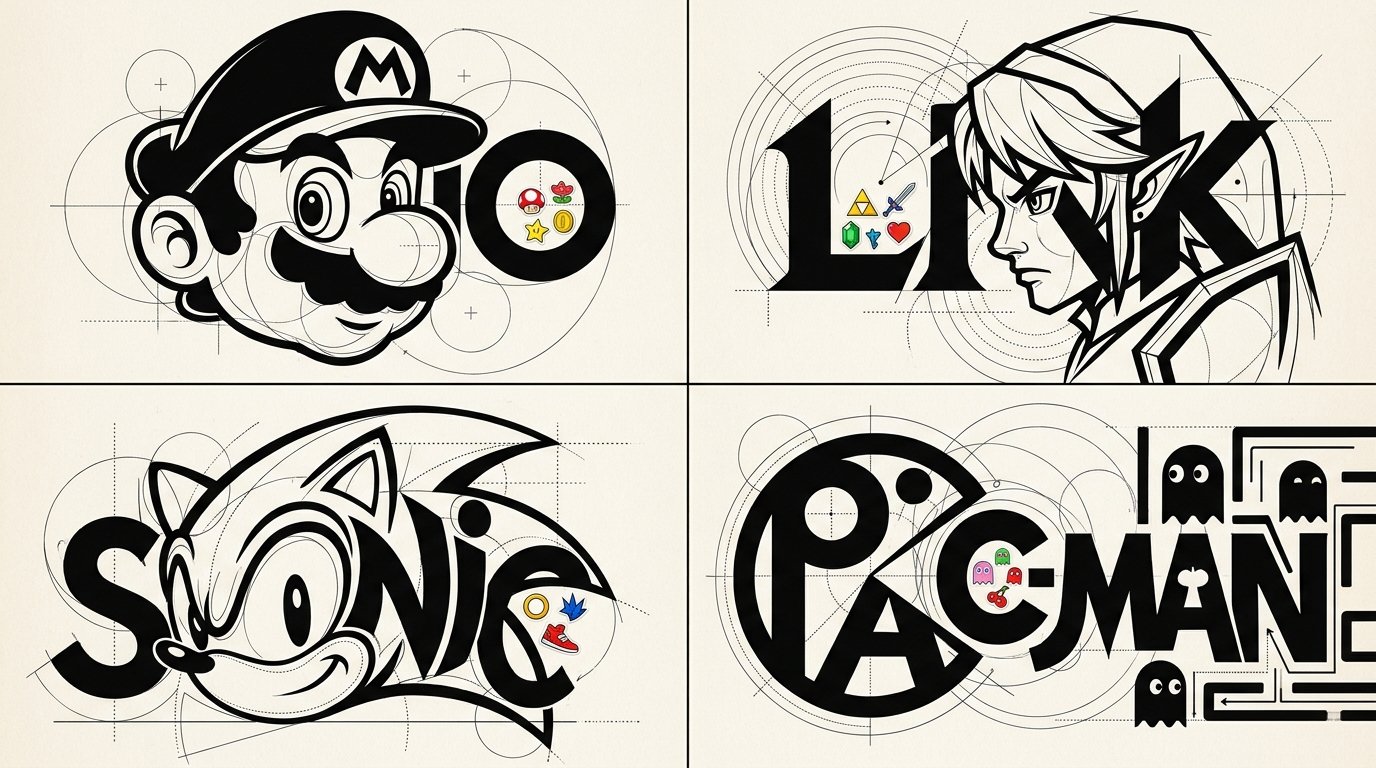
2x2 grid, 16:9, do this for 4 famous games: STYLE: LIVING LETTERFORM CARICATURES Create an experimental typographic character design of [SUBJECT] where recognizable anatomy and lettering become one unified graphic sculpture-like illustration. C₀ IDENTITY PRESERVATION Identify the subject's most recognizable physical features, including hairstyle silhouette, nose, eyes, jawline, eyebrows, and signature expression. Reconstruct these characteristics using geometric letterforms and controlled negative space. The viewer should recognize both the subject and the typographic construction. ¬C₀ = generic mascot face / unrelated character silhouette / completely abstract identity. C₁ TYPOGRAPHIC ANATOMY FUSION (master) Use the subject's name or recognizable initials as the primary structural foundation. Construct the head, hair, eyebrows, eyes, nose, mouth, and signature facial geometry through carefully manipulated typographic forms. Transform letter counters into eye shapes, rounded glyphs into facial masses, vertical stems into necks or structural elements, and curved strokes into hair or facial contours. Allow the letters and character features to share physical boundaries. The character and typography must feel inseparable rather than layered independently. ¬C₁ = portrait placed above a logo / unrelated typography / conventional wordmark / generic illustrated character. C₂ CONSTRUCTIVIST GEOMETRIC ENGINEERING Surround key forms with precise thin-line circles, overlapping arcs, tangent guides, crosshair marks, dotted construction paths, baseline grids, and small alignment points. Use dramatic contrasts between massive filled black typographic forms and delicate hairline geometric construction elements. Every guide should appear to explain how the character's visual geometry was constructed. ¬C₂ = random decorative circles / excessive technical clutter / inconsistent alignment / meaningless geometry. C₃ MICRO-STICKER INTERRUPTIONS Introduce isolated concentrations of small colorful cartoon stickers inside selected letter counters, along typographic edges, or within intentional negative spaces. Stickers should reference the subject's personality, career, recognizable accessories, or visual identity. Keep approximately 80–90% of the overall composition monochromatic, with sticker accents creating surprising pockets of color. Sticker illustrations should use bold outlines, simple expressive faces, and compact shapes. ¬C₃ = full-page sticker wallpaper / stickers covering the face / unrelated doodles / random colorful decoration. C₄ GRAPHIC MINIMALISM + CONTROLLED COLOR Primary palette: pure black and warm white. Use one or two subject-adaptive accent colors within the sticker clusters. Typography should use exceptionally heavy geometric letterforms, clean sharp edges, strong negative space, and selective high-contrast curved structures. Background remains clean and pale. ¬C₄ = full rainbow palette / photoreal textures / 3D material shaders / glossy effects / elaborate gradients. C₅ EXPERIMENTAL IDENTITY POSTER Square or portrait editorial composition. Make the fused character-wordmark occupy most of the image. Preserve generous white space around the central construction. Integrate delicate registration geometry without obscuring the primary lettering. The final artwork should function both as a recognizable character illustration and a distinctive experimental identity mark. ¬C₅ = ordinary portrait / dense stickerbomb background / realistic scenery / conventional logo placement. η HONEST GRAPHIC RENDER Precisely engineered curves, confident typography, mathematically inspired geometry, clever facial abstraction, seamless letter-character integration, clean high-contrast shapes, and crisp print quality. FORBIDDEN = ordinary text under a portrait · generic icon · excessive color · random stickers · unrelated geometric symbols · photorealism · generic cartoon avatar · 3D CGI · watermarks.