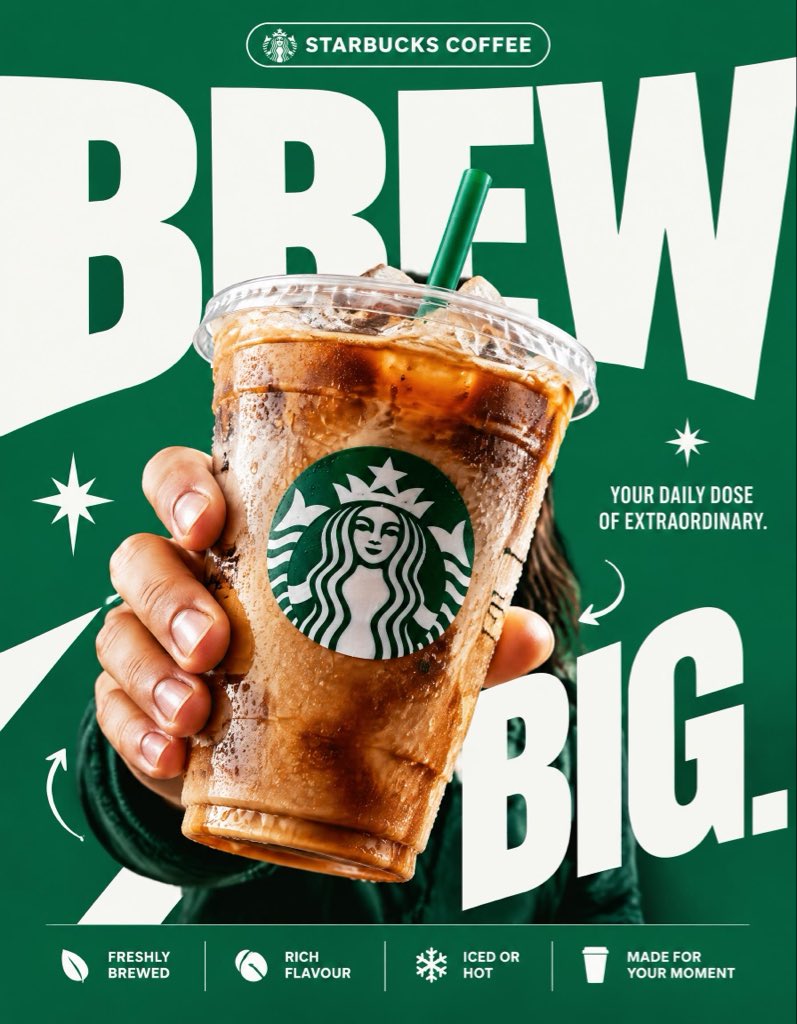
Starbucks Brew Big Bold Poster
 GPT Image 2.5OpenAIimage
STARBUCKS — “BREW BIG.” 4:5 vertical premium poster, 8K, exaggerated bold typography × high-impact commercial art direction × photorealistic product advertising 🧠 CORE IDEA: “BREW BIG.” 🎬 LAYOUT: BACKGROUND BLOCK: Solid, vivid Starbucks green background with oversized graphic shapes and strong contrast. GIANT TYPOGRAPHY: “BREW” Extremely bold, oversized, tightly cropped typography dominating almost the entire composition. Letters extend beyond the canvas edges, with the Starbucks cup overlapping the text. 👤 SUBJECT: A hand holding an iced Starbucks drink directly toward the camera, extreme forced perspective, cup dramatically enlarged in the foreground, realistic condensation, crisp ice, natural lighting. ☕ PRODUCT + VISUAL TWIST: The Starbucks cup becomes the centerpiece of the typography. The oversized word “BREW” appears to wrap behind the cup, creating striking depth through scale, layering, and composition. Keep the cup, logo, and beverage completely photorealistic. ✨ GRAPHIC ELEMENTS: * Oversized green and white shapes * Sharp contrasting shadows * Minimal starburst accents * Small directional arrows * Bold editorial layering ✍️ TEXT SYSTEM: Top pill: “STARBUCKS COFFEE” Main headline: “BREW BIG.” Supporting text: “YOUR DAILY DOSE OF EXTRAORDINARY.” BOTTOM FEATURE STRIP: * Freshly Brewed * Rich Flavour * Iced or Hot * Made for Your Moment ANTI-SLOP DIRECTION: Typography is the main design feature, not a small decorative element. Extreme scale, aggressive cropping, strong visual hierarchy, deliberate overlap, premium print-ad finish. No floating coffee beans, no miniature landscapes, no random surreal objects, no excessive particles, no cluttered layouts, no generic gradients. The final poster should feel like a bold global advertising campaign with unmistakable graphic impact.
Details
- Type
- AI Image Prompts
- Aspect Ratio
- 797:1024
- Updated
- Oct 23, 2026
How to use this prompt
- 1Copy the full prompt with the copy button above.
- 2Open GPT Image 2.5 by OpenAI, or any image generator with a similar style range.
- 3Paste the prompt, then swap the subject and style keywords to match your idea.
- 4Match the example's settings (797:1024 · Poster · Product Photography · Advertising), then iterate — small wording changes shift the output a lot.
Frequently asked questions
Which AI model generated this image?
This image was generated with GPT Image 2.5 by OpenAI. The prompt on this page is the exact text used to create it.
What settings does this prompt use?
The example was generated with GPT Image 2.5 using: 797:1024 · Poster · Product Photography · Advertising. Reusing these settings gives the closest match.
How do I get similar results?
Copy the prompt as-is first, then replace only the subject while keeping the style, lighting, and composition keywords. Generate a few variations — outputs differ between runs.
Can I modify this prompt?
Yes. Prompts work best as starting points — adjust descriptors, aspect ratio, or style tags to make the output your own.
![A striking top-down art photograph of a famous packaged food/snack from [COUNTRY], placed on a clean — AI image prompt — GPT Image 2.5](https://cdn.ahaprompt.app/harvest-media/import-1791346430372-t49ibf.jpg)
![Create a premium vertical 4:5 editorial travel poster for [COUNTRY], where the outline of the countr — AI image prompt — GPT Image 2.5](https://cdn.ahaprompt.app/harvest-media/import-1789369064970-j9jipe.jpg)
![Create a premium educational travel poster featuring [STRUCTURE NAME], one of the world’s most famou — AI image prompt — GPT Image 2.5](https://cdn.ahaprompt.app/harvest-media/import-1789369131185-x1iuzs.jpg)