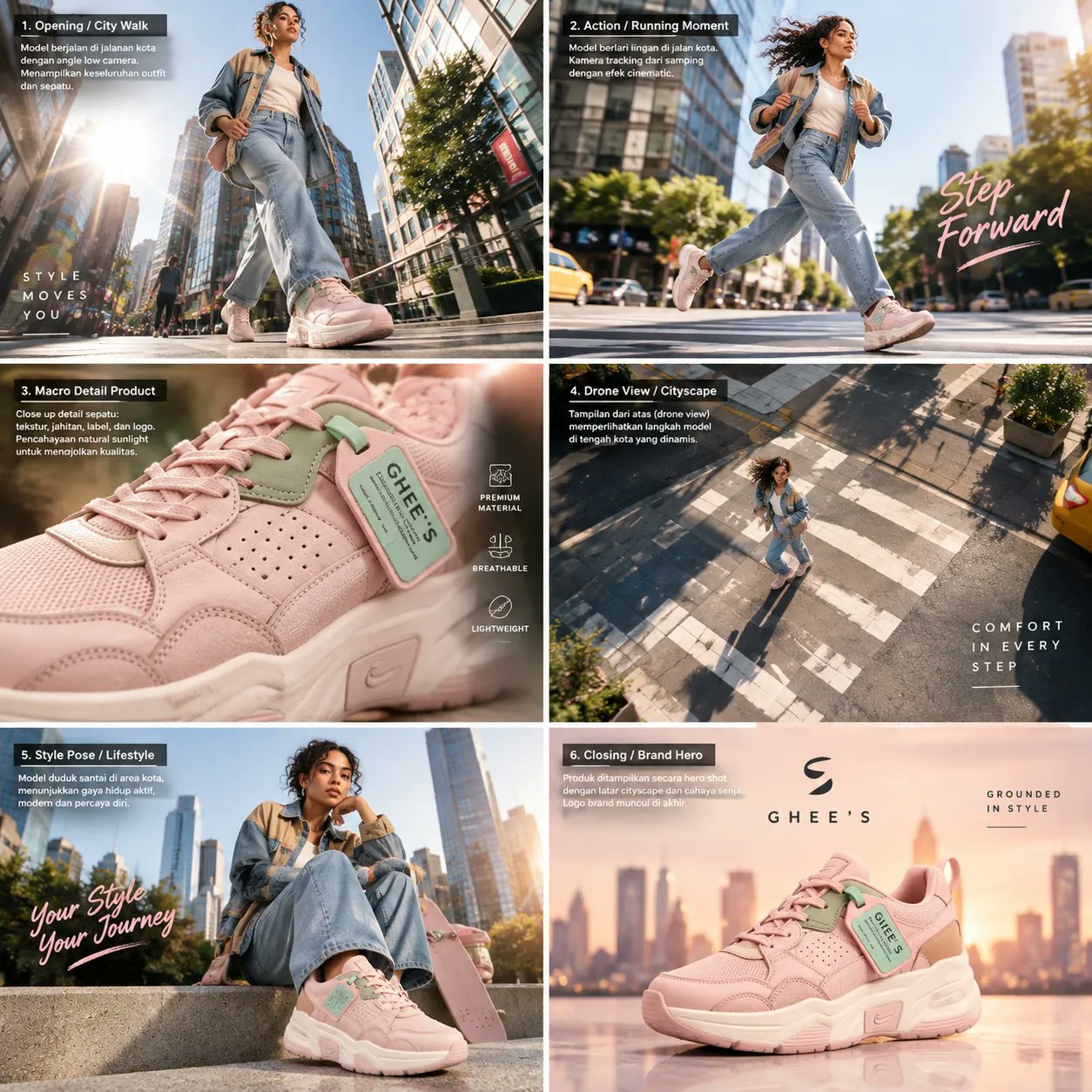
Premium Sneaker Fashion Campaign Storyboard
 GPT Image 2OpenAIimage
Master Cinematic Video Prompt —Premium Sneaker Fashion Campaign Format: Vertical 9:16 Duration: 23–25 seconds Style: Photorealistic luxury fashion commercial, cinematic streetwear campaign, premium footwear advertisement, high-end product cinematography. Main Character A stylish adult woman with natural curly black hair, medium-brown skin, and a confident, elegant presence. She wears a light-blue denim jacket with beige panels, a white top, relaxed-fit blue jeans, and pastel-pink chunky sneakers with mint-green accents. Maintain exactly the same face, hairstyle, outfit, body proportions, sneaker design, colors, and accessories throughout the entire video. Scene-by-Scene Master Storyboard Scene 1 — Hero Introduction (0–2 seconds) A low-angle, full-body tracking shot of the woman walking confidently along a modern downtown sidewalk surrounded by towering glass skyscrapers. Her curly hair moves naturally in the breeze. Soft daylight, realistic shadows, clean architectural lines, and premium fashion-editorial composition. Scene 2 — Dynamic Street Crossing (2–4 seconds) Side-tracking shot as she walks briskly across a city crosswalk. Her hair flows backward, her denim jacket moves naturally, and her pink sneakers make realistic contact with the pavement. Use subtle background motion blur while keeping her face and clothing sharp. Scene 3 — Urban Establishing Shot (4–6 seconds) A fast, smooth cinematic camera glide through the downtown avenue. Sunlight shines between skyscrapers, cars line the road, and long shadows stretch across the asphalt. Transition naturally into the next walking shot with a directional camera movement. Scene 4 — Confident Street Walk (6–8 seconds) Low-angle front three-quarter tracking shot of the woman walking along the sidewalk. Emphasize the chunky pink sneakers, natural foot movement, realistic denim texture, and soft sunlight reflecting off nearby glass buildings. Scene 5 — Overhead City Perspective (8–10 seconds) The camera rises into a dramatic bird’s-eye view of the woman crossing a wide intersection with crisp white crosswalk markings. Tiny vehicles and surrounding buildings establish scale. Keep her outfit and pink sneakers recognizable, with realistic urban geometry and continuous motion. Scene 6 — Sneaker Detail Shot (10–12 seconds) An ultra-low ground-level tracking shot follows her feet as she walks across the asphalt. Highlight the pastel-pink upper, mint-green decorative accents, thick sculpted sole, laces, stitching, and natural contact shadows. Use shallow depth of field and realistic surface textures. Scene 7 — Whip-Pan Transition (12–14 seconds) Perform a rapid upward camera tilt and controlled whip-pan, briefly creating cinematic motion blur before resolving into a top-down aerial view of the intersection. Preserve spatial continuity and avoid distorted anatomy or artificial camera warping. Scene 8 — Aerial Crosswalk Reveal (14–16 seconds) A high overhead shot shows the woman centered on the geometric crosswalk. The camera gradually descends and rotates into a street-level perspective. Bright natural daylight, realistic building shadows, and a sophisticated urban atmosphere. Scene 9 — Luxury Lifestyle Reveal (16–18 seconds) The camera returns to street level as the woman approaches a sleek silver luxury sports car parked beside the sidewalk. She slows and poses confidently beside the vehicle. Her outfit remains unchanged, and the pink sneakers are clearly visible. Use elegant reflections on the car body and polished commercial lighting. Scene 10 — Fashion and Product Composition (18–20 seconds) A medium-wide hero shot of the woman standing beside the silver car. A diagonal split-screen-style transition introduces a macro view of the pink sneaker, highlighting the mint-green accents, stitching, laces, and thick sole. Both views must depict the same exact shoe design. Scene 11 — Floating Sneaker Hero Shot (20–22 seconds) A premium product shot of the pink chunky sneaker suspended against a warm sunset city skyline. The shoe is sharply focused, with realistic material details, sculpted sole geometry, and soft golden rim lighting. Use a slow cinematic orbit and subtle parallax. The product must remain structurally accurate and undistorted. Scene 12 — Final Brand Advertisement (22–25 seconds) Transition into a polished blush-pink studio advertising layout. Place the woman in a stylish seated pose on the right, wearing the same denim outfit, with an oversized matching pink sneaker in the foreground on the left. Use clean studio lighting, soft shadows, a minimalist background, and premium editorial composition. Reserve the upper area for the brand name “GHEE'S” and the tagline “grounded in style.” Add a clean closing call-to-action reading “Grounded in style.” Keep all typography correctly spelled, aligned, and legible. Camera and Motion Direction - Blend low-angle tracking, sidefollow shots, overhead aerials, macro product photography, and smooth whip-pan transitions. - Use realistic walking biomechanics, natural hair movement, accurate contact shadows, and physically plausible lighting. - Keep the same woman, clothing, footwear, and vehicle consistent across all scenes. - Use motion blur only during fast transitions; keep important product details sharp. - Maintain a premium commercial color grade with cool urban tones transitioning into warm golden-hour highlights and a blush-pink studio finale. Negative Prompt Character identity changes, inconsistent facial features, different hairstyles, altered outfits, changing sneaker colors, redesigned footwear, malformed feet, extra fingers, distorted legs, floating steps, unnatural walking, duplicated people, duplicate shoes, warped cars, inconsistent architecture, flickering, jitter, excessive motion blur, broken typography, misspelled brand names, low-resolution textures, cartoon rendering, artificial skin, and abrupt continuity breaks. Final r
Details
- Type
- AI Image Prompts
- Aspect Ratio
- 1:1
- Updated
- Oct 11, 2026
Category
How to use this prompt
- 1Copy the full prompt with the copy button above.
- 2Open GPT Image 2 by OpenAI, or any image generator with a similar style range.
- 3Paste the prompt, then swap the subject and style keywords to match your idea.
- 4Match the example's settings (1:1 · Cinematic · Advertising · Fashion), then iterate — small wording changes shift the output a lot.
Frequently asked questions
Which AI model generated this image?
This image was generated with GPT Image 2 by OpenAI. The prompt on this page is the exact text used to create it.
What settings does this prompt use?
The example was generated with GPT Image 2 using: 1:1 · Cinematic · Advertising · Fashion. Reusing these settings gives the closest match.
How do I get similar results?
Copy the prompt as-is first, then replace only the subject while keeping the style, lighting, and composition keywords. Generate a few variations — outputs differ between runs.
Can I modify this prompt?
Yes. Prompts work best as starting points — adjust descriptors, aspect ratio, or style tags to make the output your own.