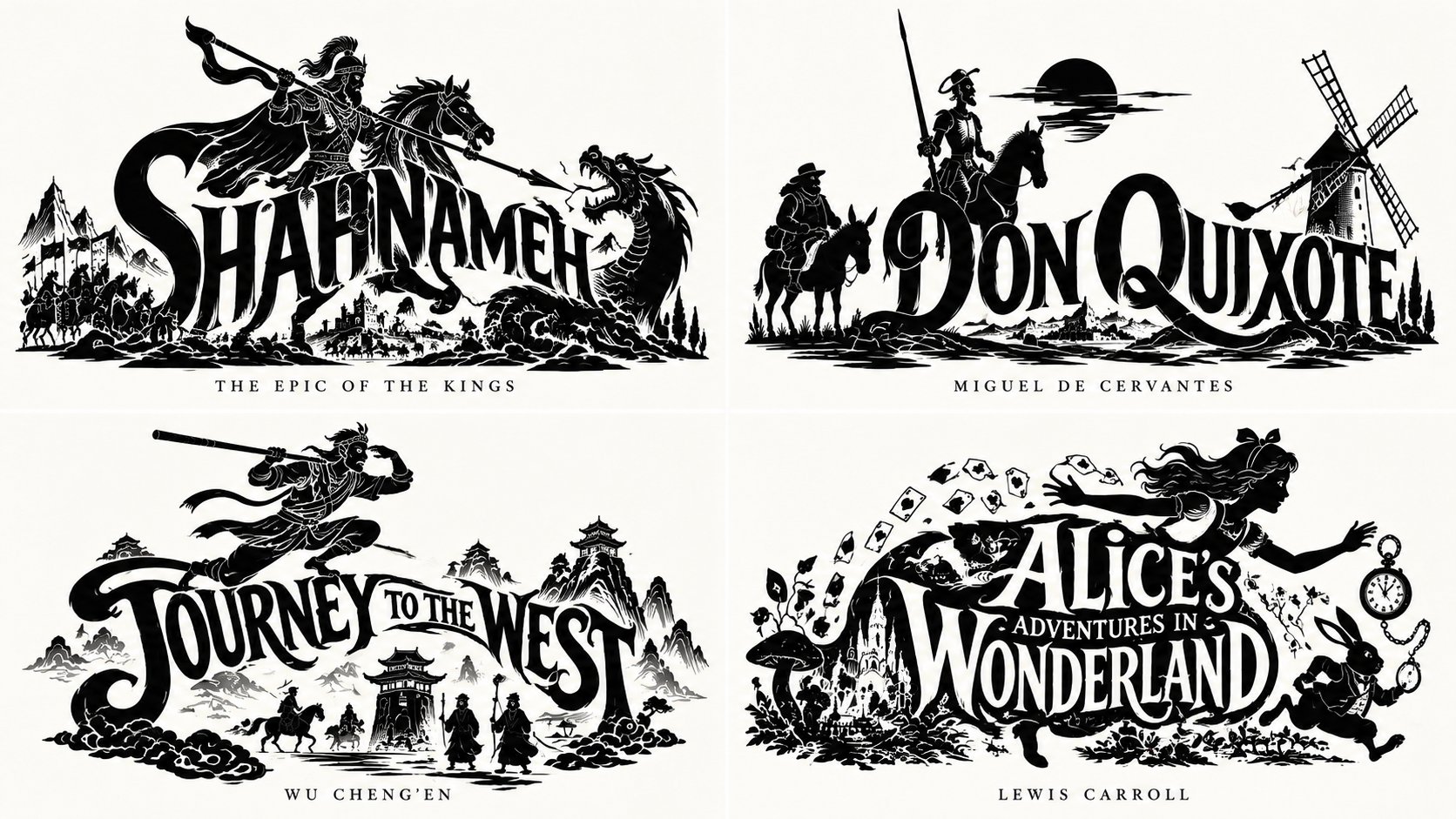
Epic Emblem Book Visualization Grid
 GPT Image 2.5OpenAIimage
2x2 grid, do this for shahnameh and non-copyrighted public space books: WITH input(work) AS ( VALUES (:WORK) ), spec AS ( SELECT title(work) tt, iconic_figure(work) fg, integration_mode(work) md, negative_lines(work) ng, caption(work) cp FROM input ), mark AS ( SELECT fuse(fg, tt, md) AS m FROM spec ) SELECT emblem_render( m, carve_negatives(m, ng), ink=>'black', ground=>'neutral', caption=>serif_caps(cp) ) AS epic_emblem FROM spec, mark -- E₁: CHECK ( integration mode applied AND connected(S ∪ W) = 1 ) -- E₂: CHECK ( figure iconic of work AND heraldic pose ) -- E₃: CHECK ( binary ink AND negative lines interior ) -- E₄: CHECK ( word legible AND silhouette coherent ) -- E₅: CHECK ( serif caps caption AND neutral ground ) -- forbidden rows (word beside figure / generic figure / gray / illegible / no caption) violate CHECKs ;
Details
- Type
- AI Image Prompts
- Aspect Ratio
- 1672:941
- Updated
- Oct 16, 2026
Category
How to use this prompt
- 1Copy the full prompt with the copy button above.
- 2Open GPT Image 2.5 by OpenAI, or any image generator with a similar style range.
- 3Paste the prompt, then swap the subject and style keywords to match your idea.
- 4Match the example's settings (1672:941 · Historical · Poster · Mythology), then iterate — small wording changes shift the output a lot.
Frequently asked questions
Which AI model generated this image?
This image was generated with GPT Image 2.5 by OpenAI. The prompt on this page is the exact text used to create it.
What settings does this prompt use?
The example was generated with GPT Image 2.5 using: 1672:941 · Historical · Poster · Mythology. Reusing these settings gives the closest match.
How do I get similar results?
Copy the prompt as-is first, then replace only the subject while keeping the style, lighting, and composition keywords. Generate a few variations — outputs differ between runs.
Can I modify this prompt?
Yes. Prompts work best as starting points — adjust descriptors, aspect ratio, or style tags to make the output your own.
![A striking top-down art photograph of a famous packaged food/snack from [COUNTRY], placed on a clean — AI image prompt — GPT Image 2.5](https://cdn.ahaprompt.app/harvest-media/import-1791346430372-t49ibf.jpg)
![Create a premium vertical 4:5 editorial travel poster for [COUNTRY], where the outline of the countr — AI image prompt — GPT Image 2.5](https://cdn.ahaprompt.app/harvest-media/import-1789369064970-j9jipe.jpg)
![Create a premium educational travel poster featuring [STRUCTURE NAME], one of the world’s most famou — AI image prompt — GPT Image 2.5](https://cdn.ahaprompt.app/harvest-media/import-1789369131185-x1iuzs.jpg)