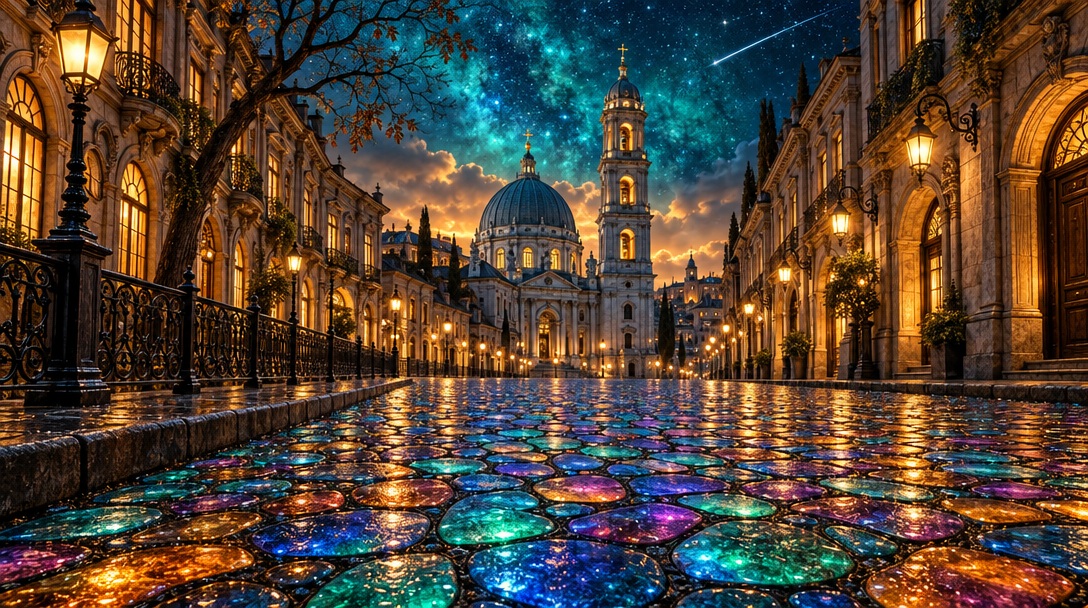
Glowing Cobblestone Old Town at Night
 GPT Image 2.5OpenAIimage
Photorealistic magical old-town street at night, wide 16:9 panoramic composition, one-point perspective, cinematic, ultra-detailed. Edge to edge, no frame, no border. STREET: the entire lower half is a mosaic cobblestone pavement of irregular rounded stones separated by dark joints, split into a central raised walkway with a low kerb on the left. Every stone glows from within like stained glass or opal — saturated turquoise and emerald flowing into cobalt blue, magenta, violet, warm amber and orange, each stone a separate luminous cell with wet cracks and bright glossy reflective highlights. TOWERS: at the vanishing point, dead centre, stands a grand blue-grey church with a large ribbed dome and a slender arcade, and beside it a tall Baroque bell tower of four stacked tiers with arched openings, a cupola and a gold finial, its windows glowing warm amber from inside. Pale warm streetlamps burn along the facade. LEFT: a curved row of ornate old-European buildings in warm brown stone with lit arched windows, wrought-iron balconies and carved cornices. A black cast-iron railing runs along the kerb. A dark angular lamppost with a glowing lantern stands at the left edge, and a bare crooked tree with sparse brown leaves rises above the rooftops. RIGHT: a mirrored row of tall classical facades in the same warm stone, with a row of streetlamps on curved arms marching into the distance, glowing amber, and deep arched doorways lit gold from within. SKY: the upper third is a deep cosmic teal and turquoise night sky, richly nebulous and swirling, scattered with countless tiny stars. A pale meteor trail streaks diagonally across the upper right. Low warm clouds glow peach and amber behind the towers at the horizon. PALETTE: turquoise, cobalt, emerald, magenta, violet, warm amber, brown stone, near-black shadow. Sharp focus, glossy wet highlights, high dynamic range, clean and unmarked.
Details
- Type
- AI Image Prompts
- Aspect Ratio
- 34:19
- Updated
- Oct 19, 2026
Category
How to use this prompt
- 1Copy the full prompt with the copy button above.
- 2Open GPT Image 2.5 by OpenAI, or any image generator with a similar style range.
- 3Paste the prompt, then swap the subject and style keywords to match your idea.
- 4Match the example's settings (34:19 · Cinematic · Architecture · Fantasy), then iterate — small wording changes shift the output a lot.
Frequently asked questions
Which AI model generated this image?
This image was generated with GPT Image 2.5 by OpenAI. The prompt on this page is the exact text used to create it.
What settings does this prompt use?
The example was generated with GPT Image 2.5 using: 34:19 · Cinematic · Architecture · Fantasy. Reusing these settings gives the closest match.
How do I get similar results?
Copy the prompt as-is first, then replace only the subject while keeping the style, lighting, and composition keywords. Generate a few variations — outputs differ between runs.
Can I modify this prompt?
Yes. Prompts work best as starting points — adjust descriptors, aspect ratio, or style tags to make the output your own.
![Create a premium vertical 4:5 editorial travel poster for [COUNTRY], where the outline of the countr — AI image prompt — GPT Image 2.5](https://cdn.ahaprompt.app/harvest-media/import-1789369064970-j9jipe.jpg)
![Create a premium educational travel poster featuring [STRUCTURE NAME], one of the world’s most famou — AI image prompt — GPT Image 2.5](https://cdn.ahaprompt.app/harvest-media/import-1789369131185-x1iuzs.jpg)
![Create a premium cinematic luxury tourism poster for [COUNTRY / DESTINATION] in a STRICT 4:5 vertica — AI image prompt — GPT Image 2.5](https://cdn.ahaprompt.app/harvest-media/import-1789369001673-dctuvc.jpg)