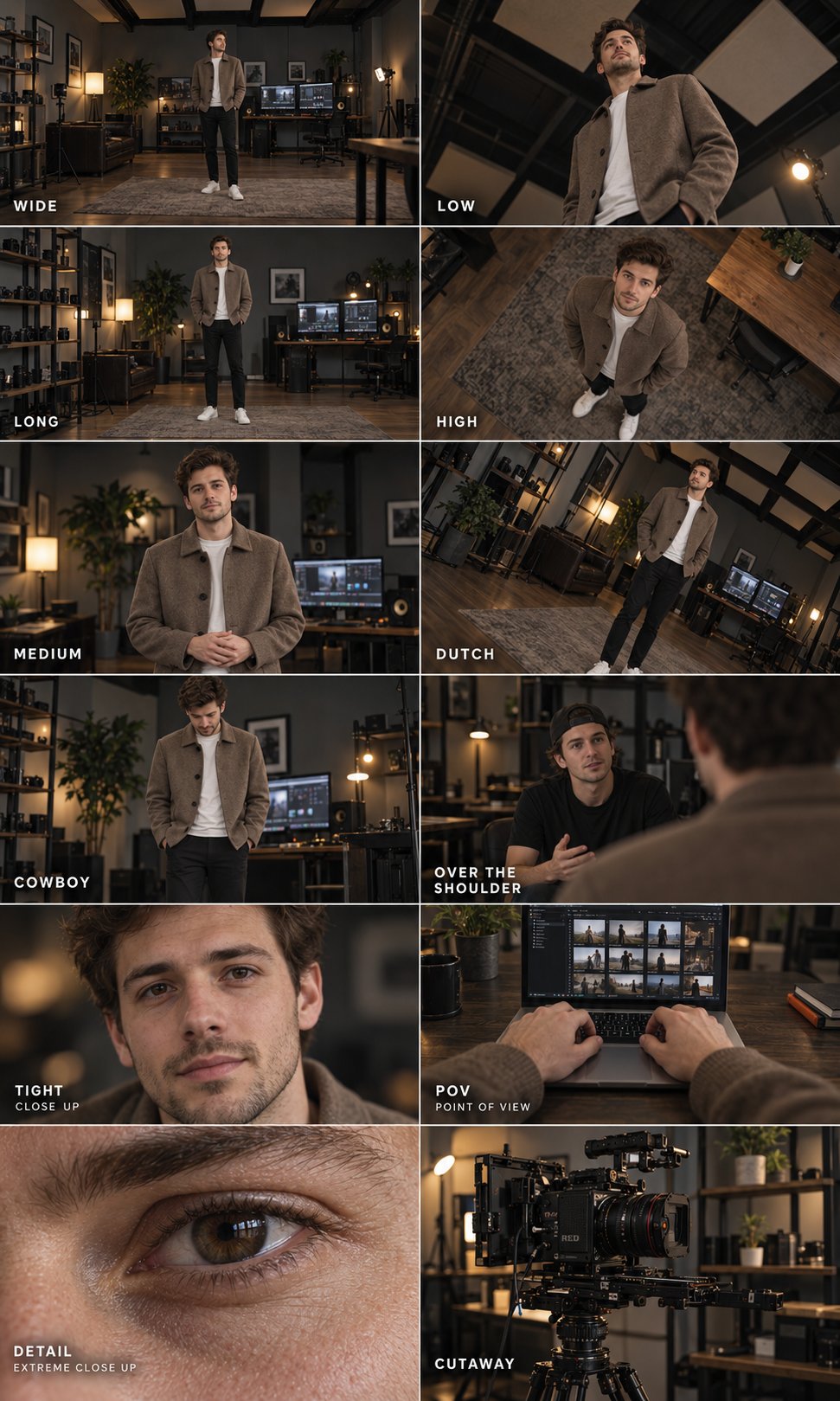
12 Camera Shots Cinematography Poster
 GPT Image 2.5OpenAIimage
Create a photorealistic cinematography reference poster containing exactly 12 panels in two equal columns and six rows. Each panel must demonstrate a distinct camera shot through an actual change in camera position or framing. Main subject: A young adult man with short styled dark-brown hair, light stubble and a slim build. He wears a textured taupe-brown coat with dark buttons over a plain white crew-neck shirt, slim black trousers and white sneakers. Preserve his facial identity, hairstyle, clothing and proportions across every panel where he appears. Location: A dim filmmaking studio with dark wooden furniture, muted grey walls, black ceiling beams, cream acoustic panels, a worktable, editing monitors, lighting stands, shelving and a leafy plant. Maintain consistent room details across viewpoints. PANEL ORDER — LEFT TO RIGHT, TOP TO BOTTOM Row 1 WIDE: Eye-level environmental shot. The man stands near the center, relatively small within the frame, surrounded by the studio and furniture. LOW: Dramatic low-angle shot looking upward from below his waist. His upper body rises against the ceiling beams, with believable perspective. Row 2 LONG: Full-length portrait showing his entire body from head to shoes, with a little space above and below. Studio equipment remains visible around him. HIGH: Camera positioned above the man, looking steeply downward as he looks up. Show the floor and nearby table to establish the elevated viewpoint. Row 3 MEDIUM: Eye-level waist-up portrait. His hands rest loosely together, expression relaxed, background softly blurred. DUTCH: Medium-long shot with the camera rolled approximately 25 degrees. The room’s vertical lines visibly tilt while the man stands naturally upright within the room. Row 4 COWBOY: Frame the man from mid-thigh to just above his head. He looks down with both hands in his coat pockets. OVER THE SHOULDER: Look past the softly blurred head and shoulder of the brown-coated man in the right foreground toward a second young adult man wearing a black T-shirt and backward black cap. Keep the second man’s face sharp. Row 5 TIGHT, with smaller subtitle CLOSE UP: Close portrait of the main subject’s face, from the top of his hair to just below his chin. Capture natural skin texture and a subtle, thoughtful expression. POV, with smaller subtitle POINT OF VIEW: First-person view from the main subject’s seated position, looking down at his hands using a laptop on a dark table. Taupe coat cuffs visible. The screen shows a plausible grid of small video thumbnails. Row 6 DETAIL, with smaller subtitle EXTREME CLOSE UP: Extreme close-up of the main subject’s eye, eyebrow and bridge of the nose. Render realistic eyelashes, pores and a small natural catchlight. CUTAWAY: An insert shot of a professional cinema camera on a support rig in the same studio, with shelving and a small potted plant behind it. No person visible. PHOTOGRAPHIC TREATMENT Real live-action film-still appearance. Soft directional lighting, restrained warm skin tones, charcoal shadows, muted brown and grey colors, subtle grain and natural contrast. Use deeper focus for environmental views and shallow depth of field for portraits and detail shots. Preserve realistic anatomy, optical perspective and consistent facial features. LAYOUT & TYPOGRAPHY Tall 3:5 poster composition, edge-to-edge imagery, uniform panel dimensions, clean aligned divisions and no large gutters. Place each shot label near the lower-left corner of its panel in white uppercase sans-serif lettering with generous letter spacing. Use smaller, clearly readable subtitles beneath TIGHT, POV and DETAIL. Split OVER THE SHOULDER into two lines to fit neatly. Keep all text inside its own panel and away from important facial details. Render only the specified shot labels. No additional headline, explanatory paragraphs, logos or watermarks. Avoid: Missing or repeated panels, incorrect shot labels, inconsistent faces or outfits, identical framing across panels, malformed hands, distorted equipment, artificial skin, illustration, excessive HDR and unreadable typography.
Details
- Type
- AI Image Prompts
- Aspect Ratio
- 971:1619
- Updated
- Oct 6, 2026
How to use this prompt
- 1Copy the full prompt with the copy button above.
- 2Open GPT Image 2.5 by OpenAI, or any image generator with a similar style range.
- 3Paste the prompt, then swap the subject and style keywords to match your idea.
- 4Match the example's settings (971:1619 · Poster · Cinematic · Realistic), then iterate — small wording changes shift the output a lot.
Frequently asked questions
Which AI model generated this image?
This image was generated with GPT Image 2.5 by OpenAI. The prompt on this page is the exact text used to create it.
What settings does this prompt use?
The example was generated with GPT Image 2.5 using: 971:1619 · Poster · Cinematic · Realistic. Reusing these settings gives the closest match.
How do I get similar results?
Copy the prompt as-is first, then replace only the subject while keeping the style, lighting, and composition keywords. Generate a few variations — outputs differ between runs.
Can I modify this prompt?
Yes. Prompts work best as starting points — adjust descriptors, aspect ratio, or style tags to make the output your own.
![Create a premium vertical 4:5 editorial travel poster for [COUNTRY], where the outline of the countr — AI image prompt — GPT Image 2.5](https://cdn.ahaprompt.app/harvest-media/import-1789369064970-j9jipe.jpg)
![Create a sophisticated, dreamy editorial magazine cover titled “[COUNTRY NAME] — A COUNTRY IN ONE DR — AI image prompt — GPT Image 2.5](https://cdn.ahaprompt.app/harvest-media/import-1789368946131-xefjx1.jpg)
![Create a premium educational travel poster featuring [STRUCTURE NAME], one of the world’s most famou — AI image prompt — GPT Image 2.5](https://cdn.ahaprompt.app/harvest-media/import-1789369131185-x1iuzs.jpg)
![Create a premium cinematic luxury tourism poster for [COUNTRY / DESTINATION] in a STRICT 4:5 vertica — AI image prompt — GPT Image 2.5](https://cdn.ahaprompt.app/harvest-media/import-1789369001673-dctuvc.jpg)