Introduction: Why Nano Banana Pro Excels at Portraits
Nano Banana Pro has quickly become the go-to AI image model for creators who want stunning, photorealistic portraits. Whether you're looking to create professional headshots, artistic character studies, or fun expression grids, Nano Banana Pro delivers exceptional results with the right prompts.
In this guide, we'll share battle-tested prompts from our community that consistently produce amazing portrait results. Each prompt has been refined through extensive testing and is ready for you to copy and use immediately.
Essential Portrait Prompt Techniques
Before diving into specific prompts, here are key techniques that make Nano Banana Pro portraits shine:
- Specify lighting conditions - Terms like "studio lighting," "soft natural daylight," or "cinematic lighting" dramatically affect results
- Include camera details - Mentioning lens types (e.g., "50mm," "35mm f/1.4") adds photographic realism
- Define the style clearly - Whether it's "photorealistic," "3D cartoon," or "illustration style"
- Add environmental context - Background details help create cohesive, professional-looking images
Featured Portrait Prompts
1. 3D Cartoon Expression Grid
Create a versatile 3x3 grid showing the same person with different expressions and styles. Perfect for character design or social media content.
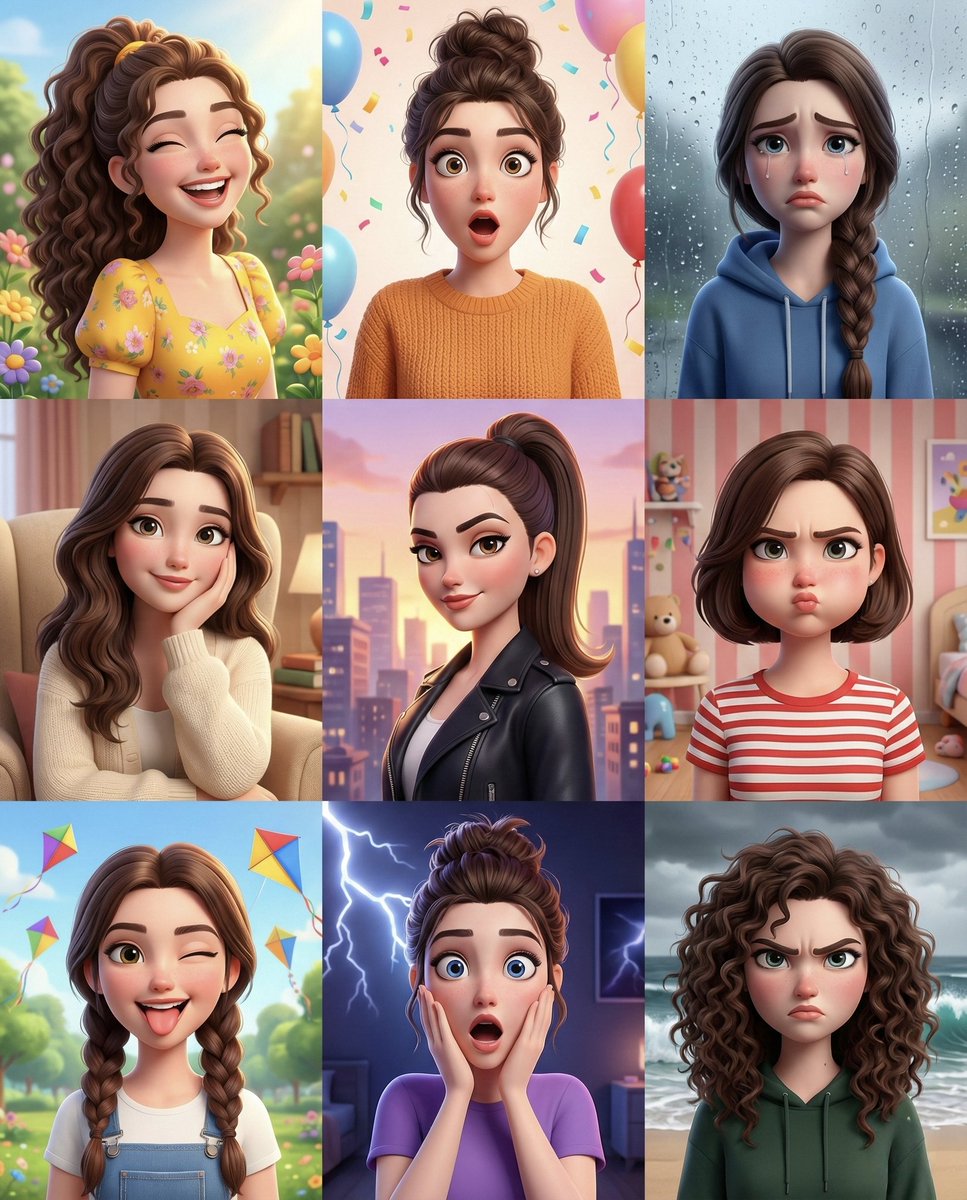
{
  "image_prompt": {
    "format": "3x3 grid collage",
    "subject": {
      "face_reference": "uploaded_photo",
      "face_identity_lock": true,
      "face_match_accuracy": "100%",
      "style": "polished smooth 3D cartoon",
      "skin": "soft, smooth, realistic cartoon texture"
    },
    "panels": [
      {
        "expression": "joyful",
        "pose": "bright smile, slightly raised shoulders",
        "hairstyle": "high ponytail",
        "outfit": "pastel hoodie",
        "background": "soft gradient sky blue"
      },
      {
        "expression": "surprised",
        "pose": "hands near face, wide eyes",
        "hairstyle": "loose wavy hair",
        "outfit": "casual t-shirt",
        "background": "light peach backdrop"
      },
      // ... additional panels for sad, tender, daring, puffed cheeks, playful, shocked, furious
    ],
    "rendering": {
      "lighting": "soft studio lighting, evenly balanced across all panels",
      "shading": "smooth gradients, subtle highlights",
      "quality": "ultra-high resolution",
      "consistency": "harmonized color palette and proportions across all panels"
    }
  }
}
Pro tip: Upload your own photo as a reference to maintain face consistency across all 9 panels.
2. Life in Portraits: Age Progression Journey
Generate a stunning 4x4 grid showing a person's journey through life, from infancy to old age. Each panel reflects the specified age through clothing, hairstyle, and environment.
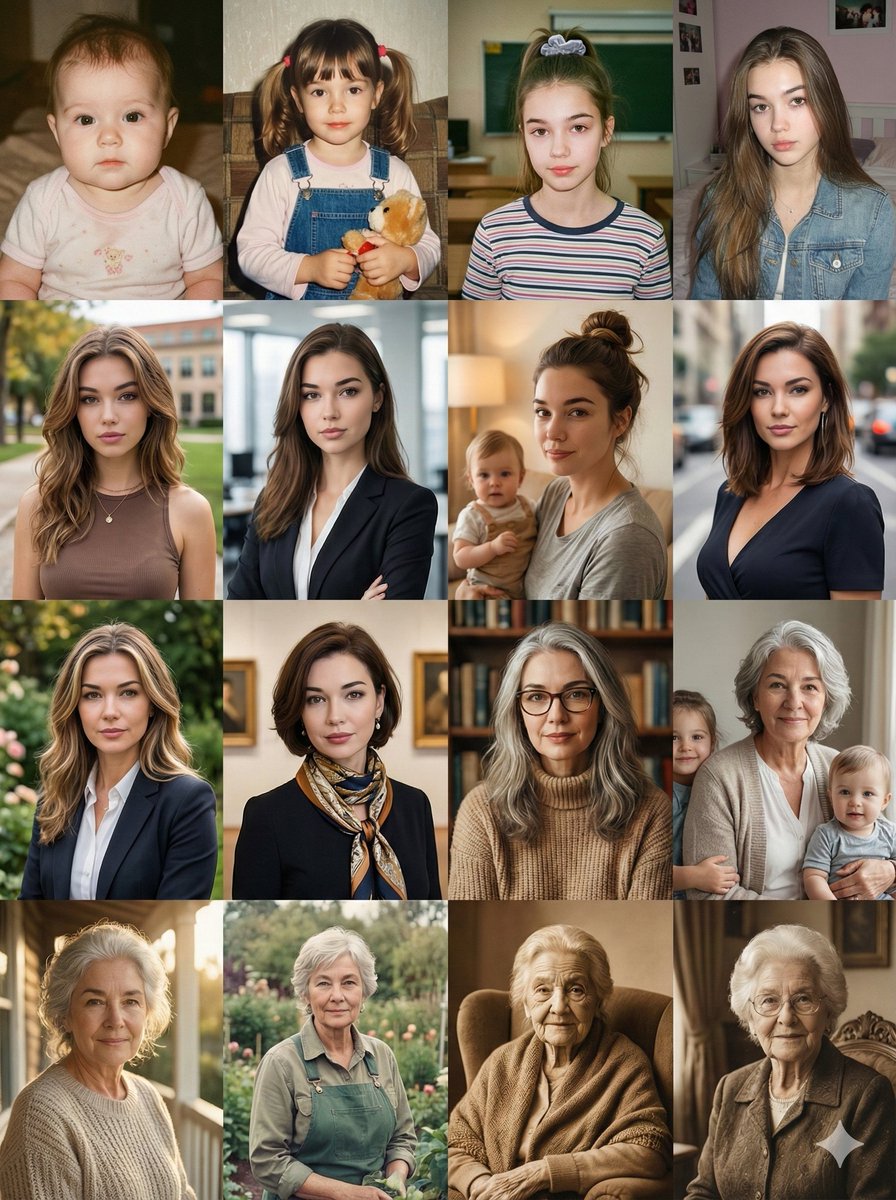
{
  "image_type": "grid_layout",
  "grid_dimensions": "4x4",
  "subject_consistency": "single_female_character",
  "theme": "chronological_aging_process",
  "math_formula": "Age = 1 + (square_position - 1) * 5",
  "visual_style": "photorealistic, cinematic portraiture, soft natural lighting",
  "prompt_payload": {
    "main_instruction": "Generate a 4x4 grid of portraits depicting the lifespan of a single female subject with brown hair and brown eyes, evolving from infancy to old age.",
    "row_1_childhood": {
      "panel_1": "Age 1: Cute baby with wispy hair in a pink onesie, close-up.",
      "panel_2": "Age 6: Little girl with pigtails holding a teddy bear, cozy home background.",
      "panel_3": "Age 11: Pre-teen schoolgirl with a high ponytail, wearing a striped shirt in a classroom.",
      "panel_4": "Age 16: Teenager with long straight hair, wearing a denim jacket, bedroom background."
    }
    // ... continues through adulthood, middle age, and senior years
  },
  "technical_parameters": {
    "resolution": "8k",
    "aspect_ratio": "1:1",
    "lighting": "Golden hour, window light, cinematic depth of field"
  }
}
3. Branded Polygon Portrait
Create a professional lifestyle photo with a striking polygon art illustration of the subject painted on a wall beside them. Perfect for personal branding and social media profiles.
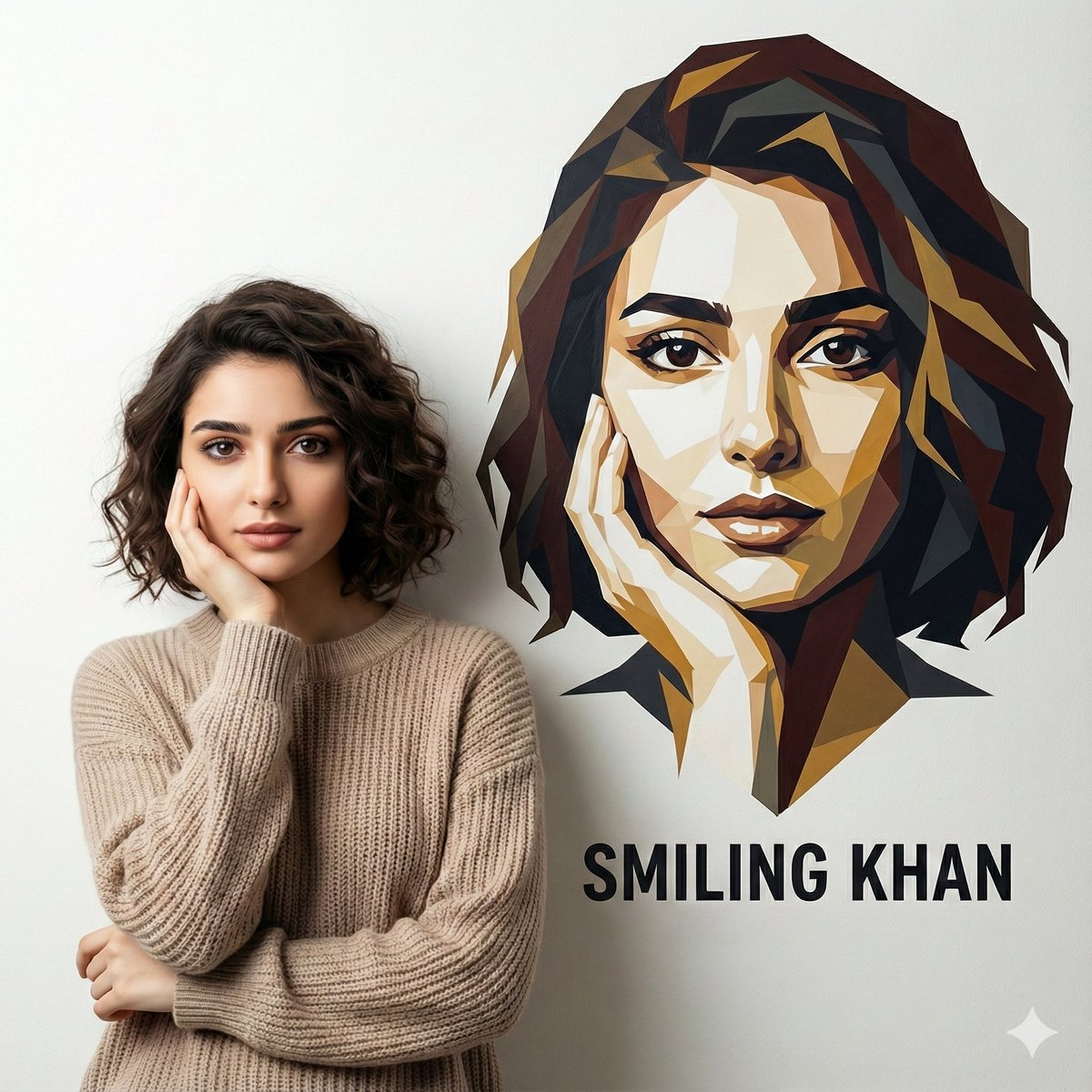
Professional lifestyle photo using the uploaded image, subject leaning against a white wall. Beside them, a high-contrast polygon art illustration of their face painted on the wall. Add minimal logo-style text with name, branding-focused look.
Why it works: This prompt combines photorealism with artistic elements, creating a unique personal brand image that stands out.
4. Creative Spark: Doodle-Framed Portrait
Transform a portrait into an illustrated scene surrounded by hand-drawn doodles and motivational text. Great for creative professionals and content creators.
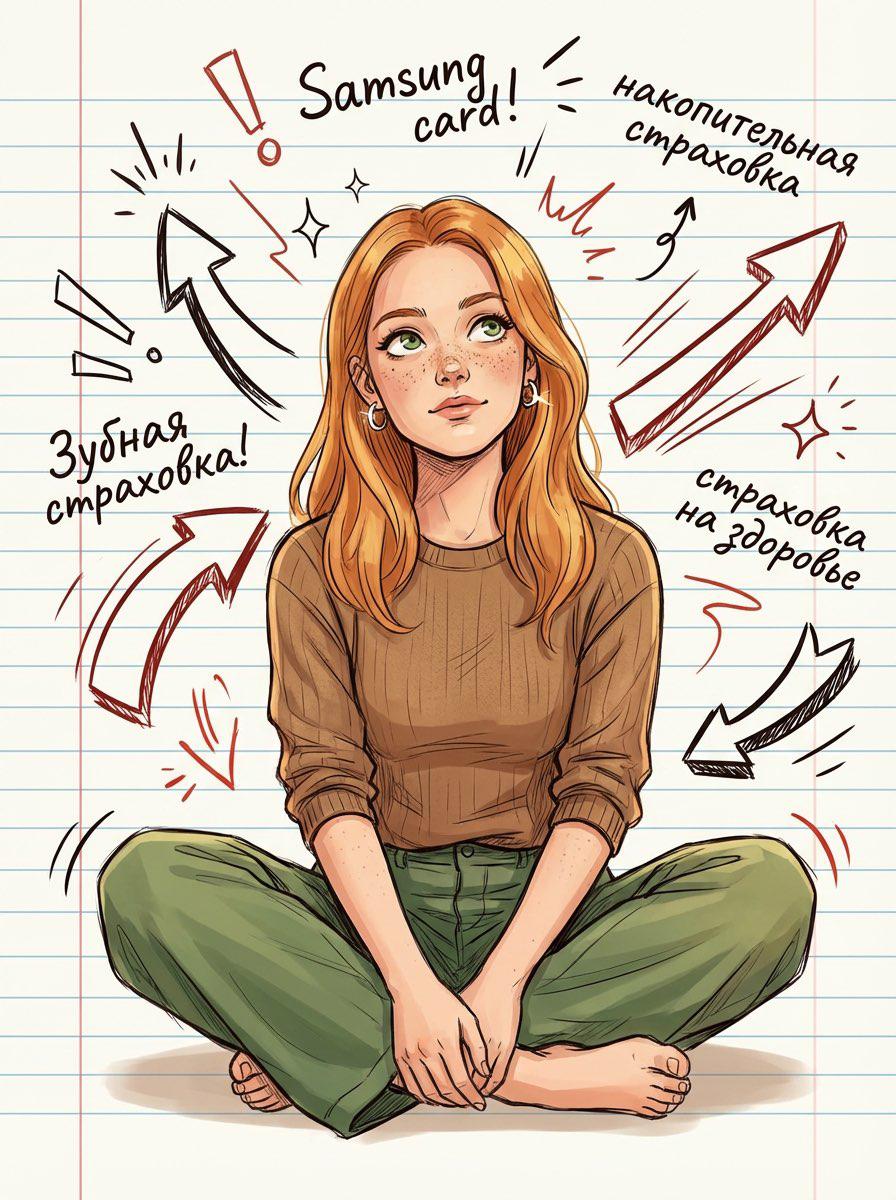
Illustrated portrait of a thoughtful young woman sitting cross-legged on a ruled notebook background. Surround her with bold hand-drawn doodles—arrows, sparks, dynamic lines—and scribbled motivational words. Floating, loose, wavy hair; silver earrings catching subtle light. She wears a casual earthy-toned outfit, relaxed posture, expressive eyes looking upward as if forming a new idea. Clean, modern comic-sketch style with crisp linework and smooth shading.

ImageRatio = 3:4
Quality = Ultra clean, high detail, illustration-grade
Style = Modern comic-sketch, warm tones, hand-drawn doodle accents around her. Soft, warm shading on her face.
5. Minimalist Therapy Room with Dual Ages
Create a thought-provoking image showing the same person at two different ages in conversation. Perfect for psychological or introspective content.

Photorealistic minimalist therapy room; light walls, grey sofa, wooden coffee table with a tissue box, notebook and a glass of water, simple frame and floor lamp, soft natural daylight. The same person at two ages sits side-by-side: adult on the left speaking with open hands; child on the right listening with head slightly down. Both wear matching [OUTFIT] (same color & style). Clean studio vibe, centered composition, shallow depth of field, 50mm look, 4K, vertical 3:4. No extra people, no text, no watermark.
Customization tip: Replace [OUTFIT] with specific clothing descriptions to match your creative vision.
6. Hyper-Realistic Facial Analysis Infographic
Generate a futuristic AI-style facial analysis overlay on any portrait. Perfect for beauty tech, skincare, or sci-fi content.
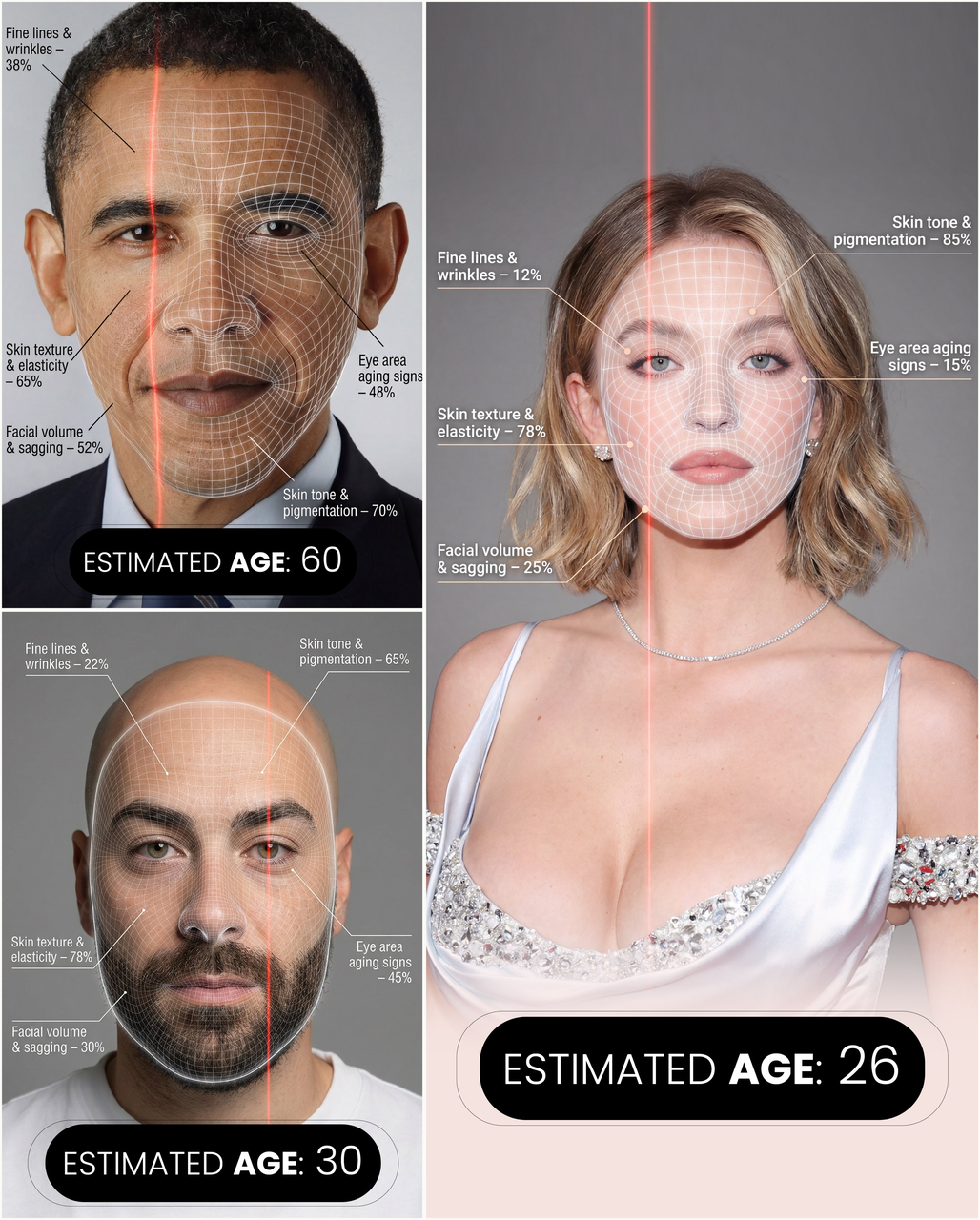
Create a hyper-realistic, high-resolution portrait infographic based on (your photo). Keep the identity, hairstyle, clothing, and natural skin tone unchanged, and use a neutral studio background. Overlay a subtle semi-transparent facial analysis grid on the entire face, similar to a 3D facial scan grid: fine, soft white lines extending along the facial contours, slightly glossy but not obscuring skin details. Add a clear vertical red laser line on one side of the face, like a futuristic scanning effect.

Create a concise medical beauty infographic using global data percentages to evaluate 5 aging factors with labels pointing to corresponding facial areas.

Overall style: Futuristic AI-guided skincare analysis, minimalist, high-end editorial lighting, gender-neutral.
Advanced Portrait Techniques
Using Image-to-Image for Consistent Characters
For projects requiring the same character across multiple images:
- Upload a reference photo
- Specify "face_identity_lock: true" in your prompt
- Use consistent lighting and style descriptors
Creating Expression Sheets
Expression sheets are invaluable for character design. Key elements to include:
- Grid format specification (3x3, 4x4)
- Emotion labels for each panel
- Consistent background colors
- Uniform lighting across all panels
Makeup and Style Transfer
You can transfer makeup styles between images with prompts like:
Apply the makeup from Image 2 to the character in Image 1, while maintaining the pose from Image 1.
Start Creating Amazing Portraits
These prompts represent some of the best portrait techniques our community has discovered for Nano Banana Pro. Each one is ready to copy and paste directly into Google AI Studio or any Nano Banana-powered application.
Ready to explore more? Browse all portrait prompts →
Have a great portrait prompt to share? Join our community and contribute your discoveries!